
Multilingual Support
Every employee should get the same level of support no matter where they work or what language they speak. With Native Multilingual Search, the AI Assistant:
- Understands and responds in 100+ languages, tuned for enterprise use.
- Searches knowledge natively in 30+ languages, across knowledge articles, FAQs, and files.
- Primarily responds in the language of the user’s query, and falls back to the user’s preferred language. The Assistant can still use the preferred language when, for example, the user switches languages often in one thread, or a short query doesn’t give a clear language signal.
- Uses geography and language as built-in ranking signals, so there’s no Hard or Soft boost to configure.
What changed with Native Multilingual Search
Configure Multilingual Support
To set up the Assistant for multiple languages, follow Configure Multilingual Support. For common problems and fixes, see Multilingual Support Troubleshooting.
How it works
Supported languages
The Assistant can understand, respond, and translate in more than 100 languages, tuned for enterprise use. These include:
How a non-English request moves through the engine
- The first time a user writes to the Assistant, a fine-tuned fastText model detects the language. If the message isn’t in English, the Assistant offers to change the user’s preferred language.
- Users can change their preferred language, but the Assistant primarily replies in the language of the query. The preferred language setting is used to translate in-chat notifications, such as Employee Comms, ticket updates, and password expiry notices.
- The Assistant reads the request in its original language, including the query rewrite step.
- The reasoning engine picks the relevant tools and extracts arguments from the request. It keeps each argument in the original language, or translates it to English when the tool needs English.
- The tool runs. For example, Enterprise Search can search natively in 30+ languages, so the engine passes the query in its original language and content is retrieved and ranked in that language.
- The engine replies in the language of the user’s query. In-chat notifications, such as Employee Comms, ticket updates, and password expiry notices, use the user’s preferred language.
For the full turn, see What Goes Into a Turn and Tool Selection.
Data masking and privacy
Moveworks runs translation on a closed platform to protect user privacy and company intellectual property.
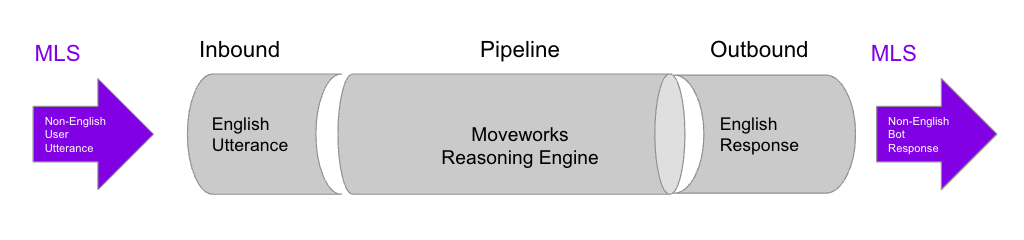
The inbound and outbound translation models, which are LLMs, are hosted under Moveworks’ existing privacy and security protocols. See Security and privacy settings.
Product features
The Assistant primarily replies in the language of the user’s query, whatever the preferred language setting is. For example, a user whose preferred language is German who asks a question in English gets an English answer. If their next question is in German, the Assistant answers in German. The preferred language is still the default for non-conversational surfaces, such as Employee Comms and proactive notifications, and the fallback when the query language is unclear.
As with any LLM-driven system, the model can occasionally fall back to English or the preferred language when the language signal is unclear. Moveworks tracks these cases, and they improve with each model upgrade.
Change language
Users can change their preferred language in three ways:
- Language detection. When a user first writes to the Assistant in a supported language other than English, the Assistant offers to change their preferred language in an extra message alongside its answer.
- This happens only the first time the user writes in a non-English language. If the user switches back to English later, the Assistant doesn’t offer again, so non-English users aren’t asked repeatedly.
- If the language was detected wrong, the user can click
No, don't ask again. The offer won’t appear again, since the user has confirmed English is their primary language.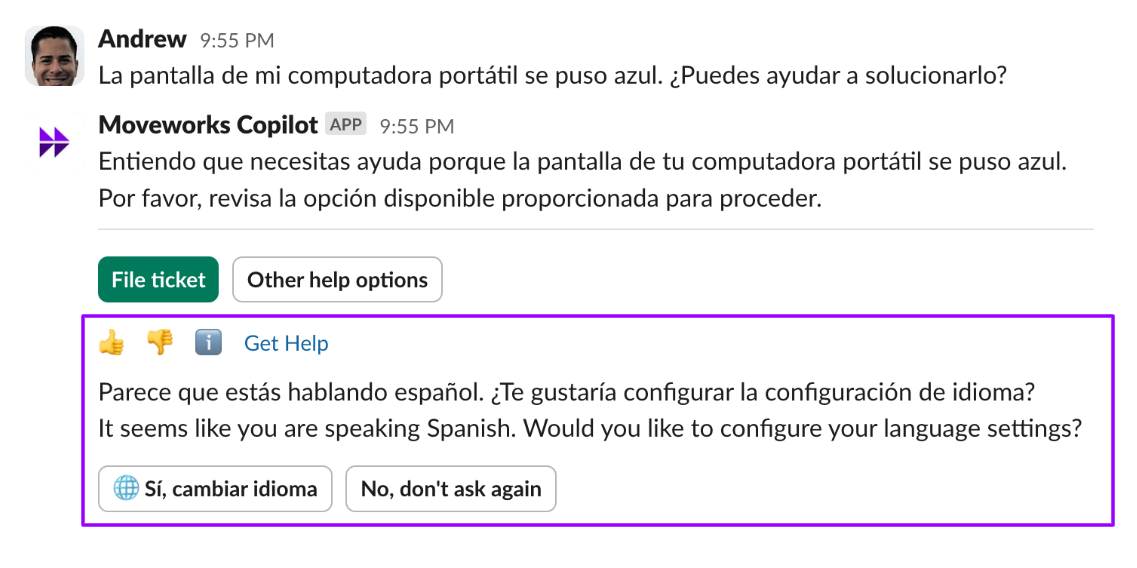
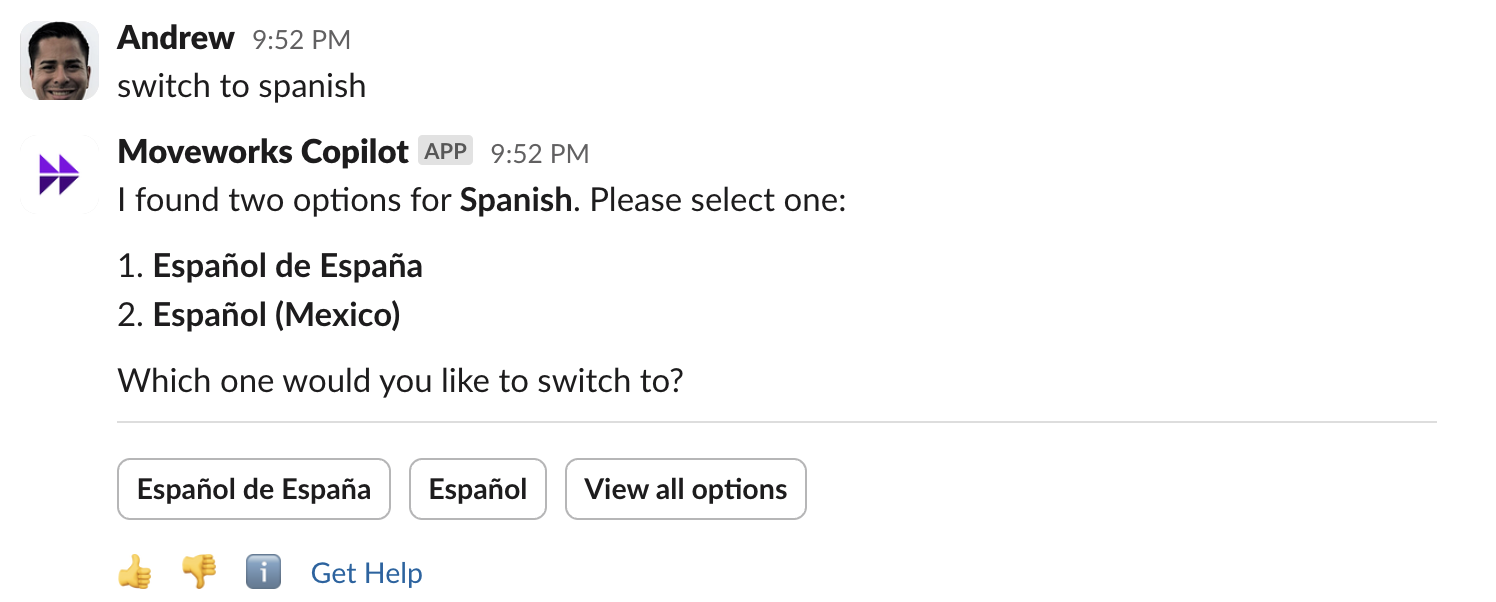
- Ask directly. Users can say “change language” or “change to Spanish”, in English or any other language. The Assistant reads the intent of the request.
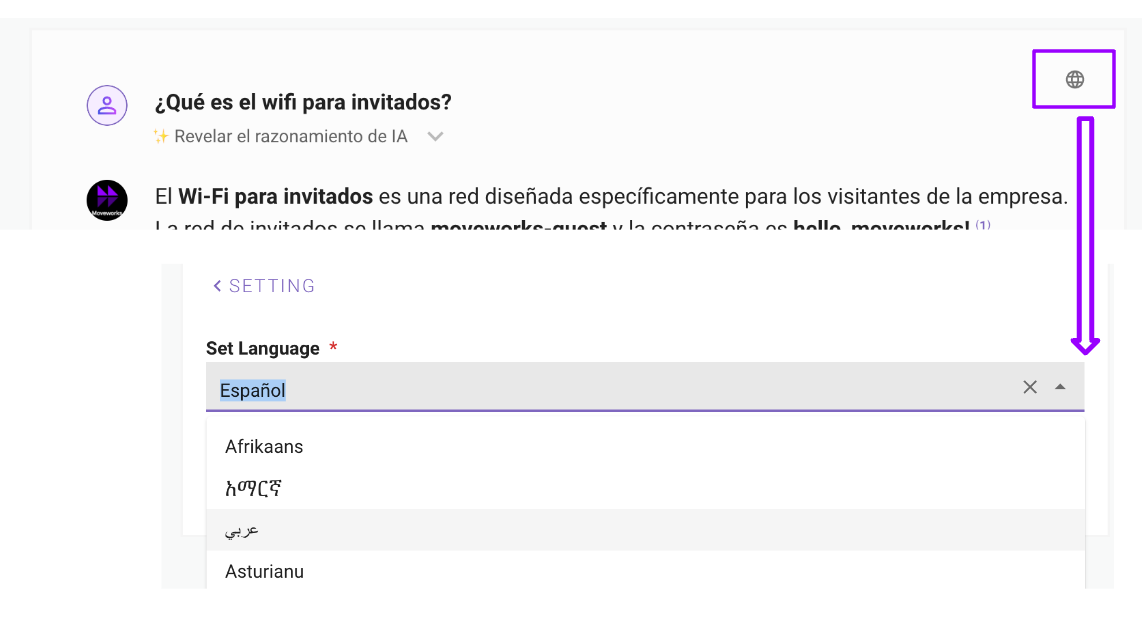
- Reference page. Users can pick a language from the globe icon on the reference page. On web, the change shows the next time the user opens the reference page.
Translate conversations between employees and agents
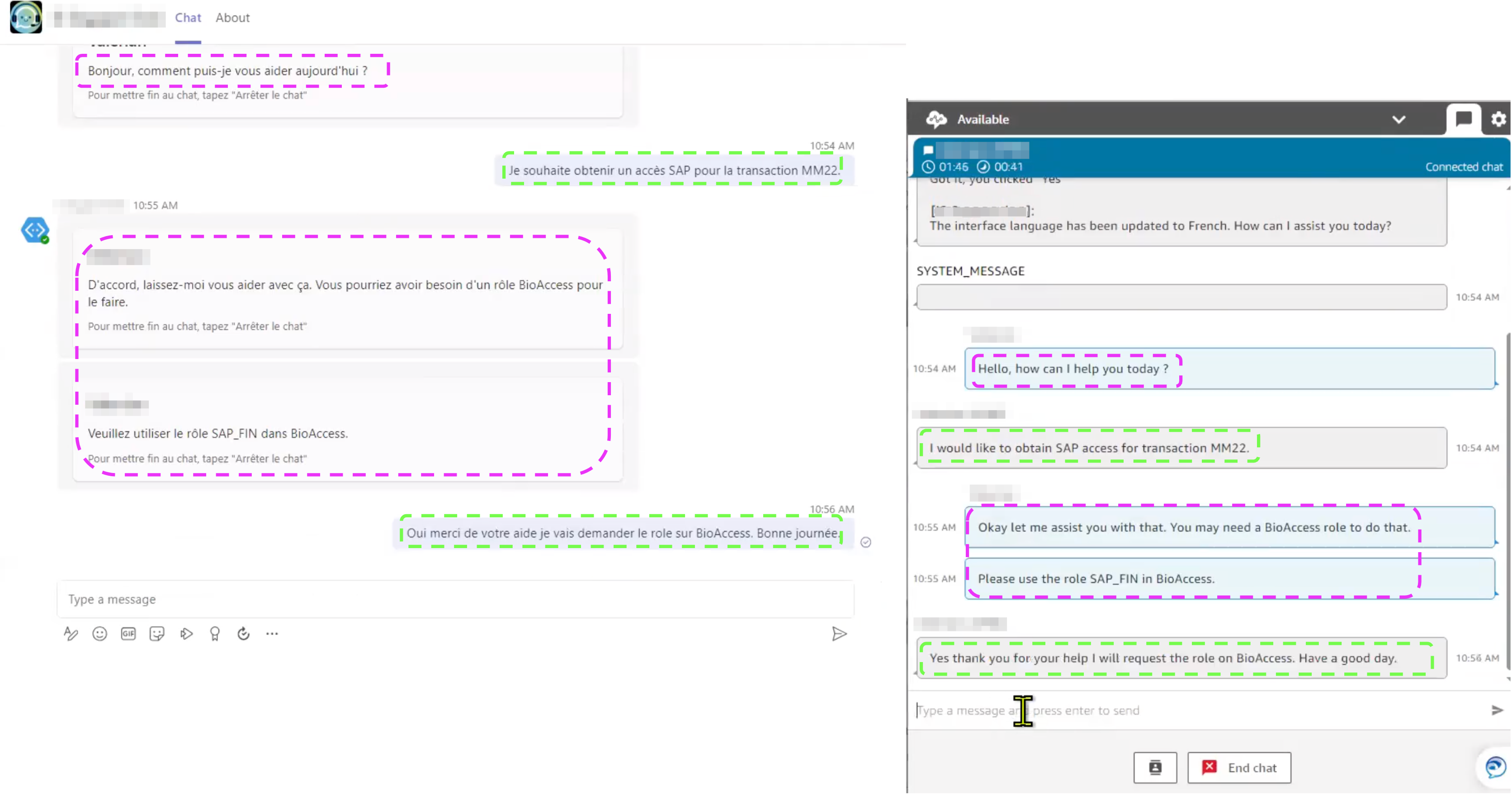
The Assistant translates between employees and agents in two ways:
-
Live agent message brokering. The Dynamic Translation Service (DTS) translates conversations between employees and agents as they happen, from the employee’s language into English for the agent. See Live Agent Message Brokering.
-
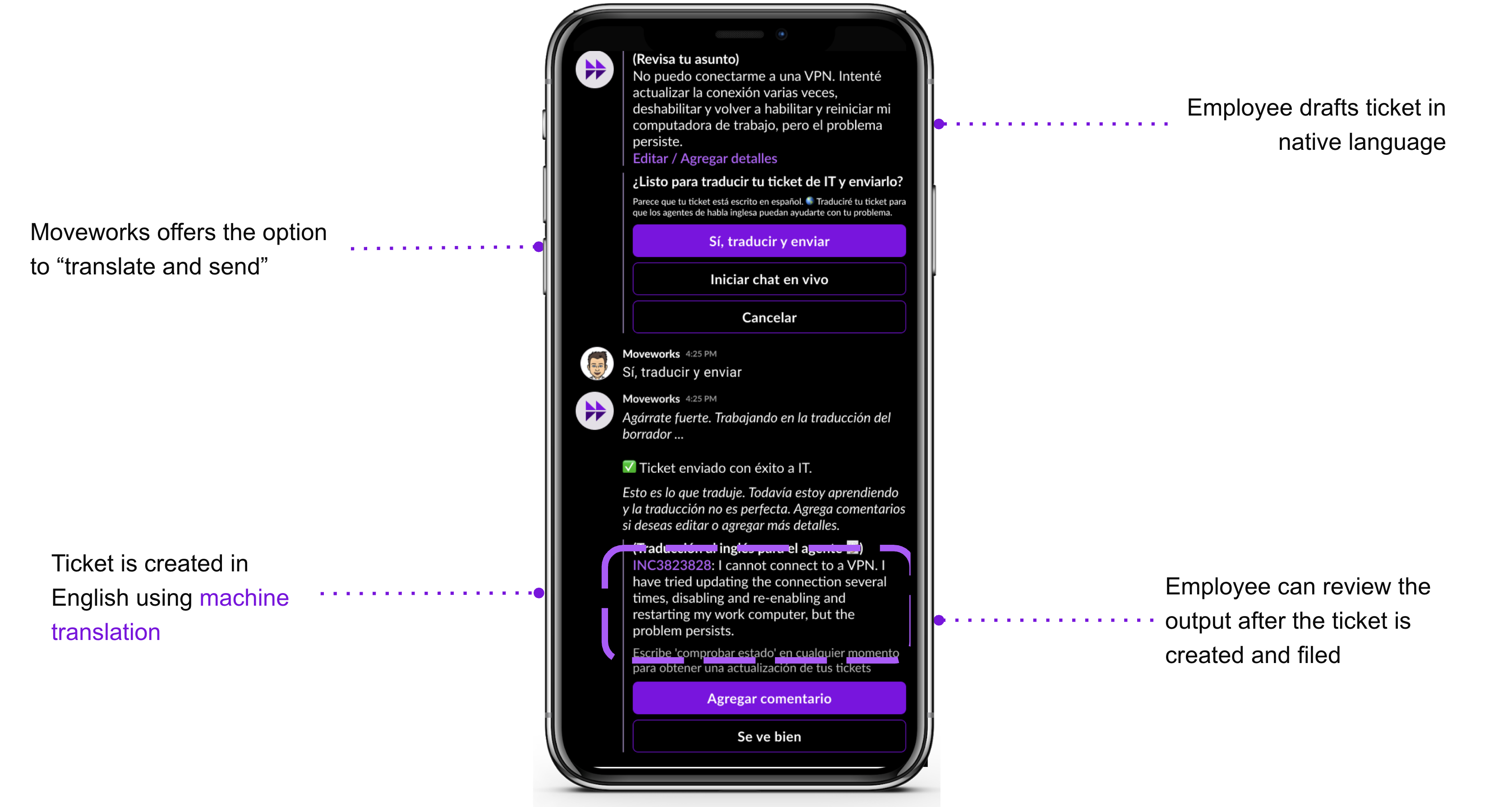
In-chat ticket translation. Tickets filed from chat are translated into the ticketing system, and the original non-English message is kept in the ticket work note. This assumes agents work in English. See Ticket filing translation.
On-the-fly translation
Moveworks uses an LLM for on-the-fly (OTF) outbound translation. This gives:
- Better translation quality on Moveworks’ internal benchmarks, and cleaner handling of markdown.
- Better translation of short text. Form names and the cards and buttons in queries and paths give a translation model little context. The LLM handles them better.
- Support for several locales of one language, such as Traditional and Simplified Chinese.
Knowledge and files
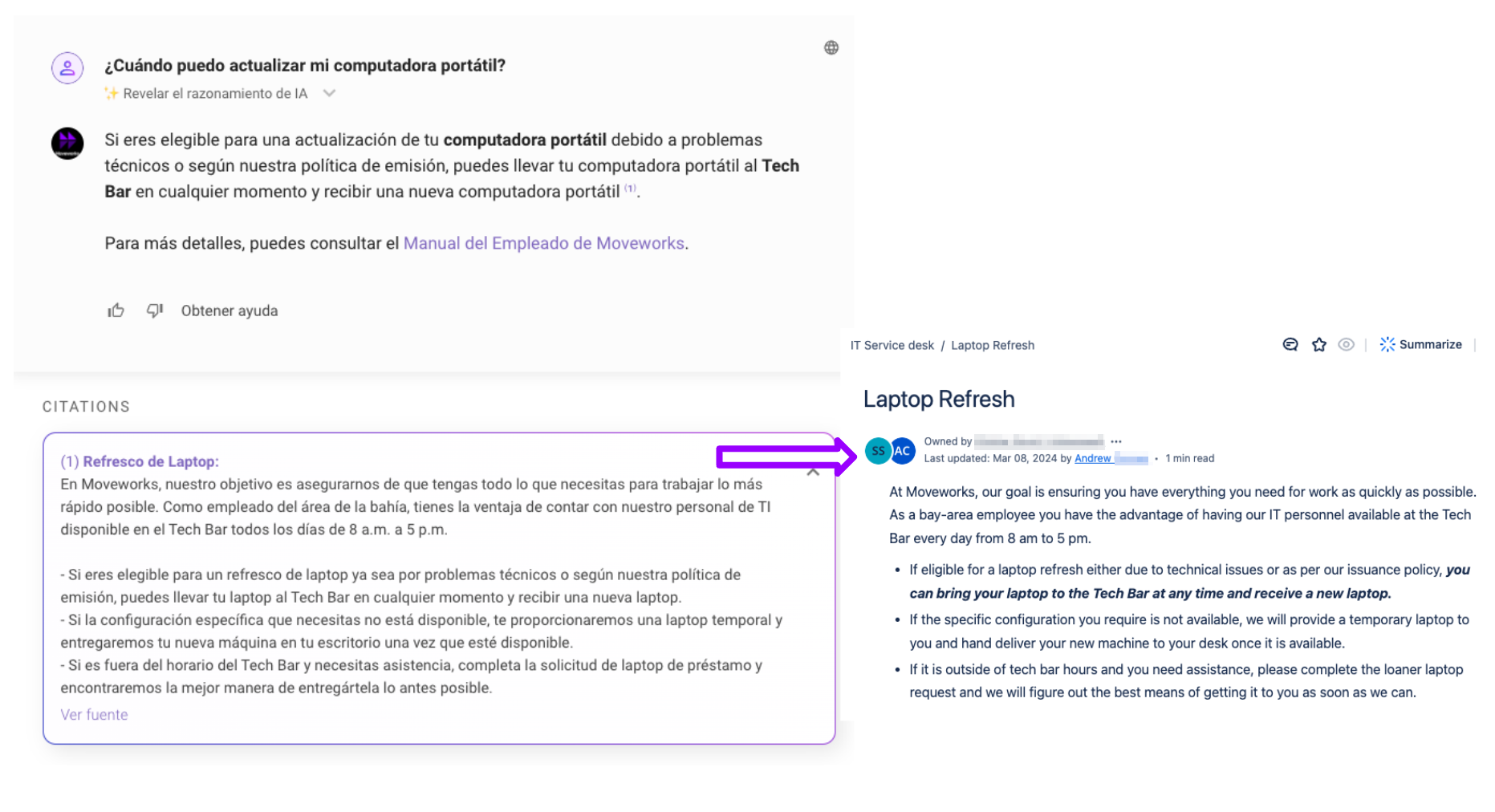
With Native Multilingual Search, the Assistant searches your configured knowledge bases, FAQs, and files with native multilingual ranking:
- Retrieval follows the user’s language, first the query language, then the preferred language. A German query surfaces relevant German content and cross-lingual matches, ranked in the content’s original language.
- The AI-generated summary above the citations is primarily in the user’s query language.
- Non-English knowledge articles are no longer limited to users configured for that language. Native ranking handles cross-lingual matching.
- In the Assistant, citations are translated into the user’s preferred language. In the Enterprise Search web app, citations show in their original language.
Forms
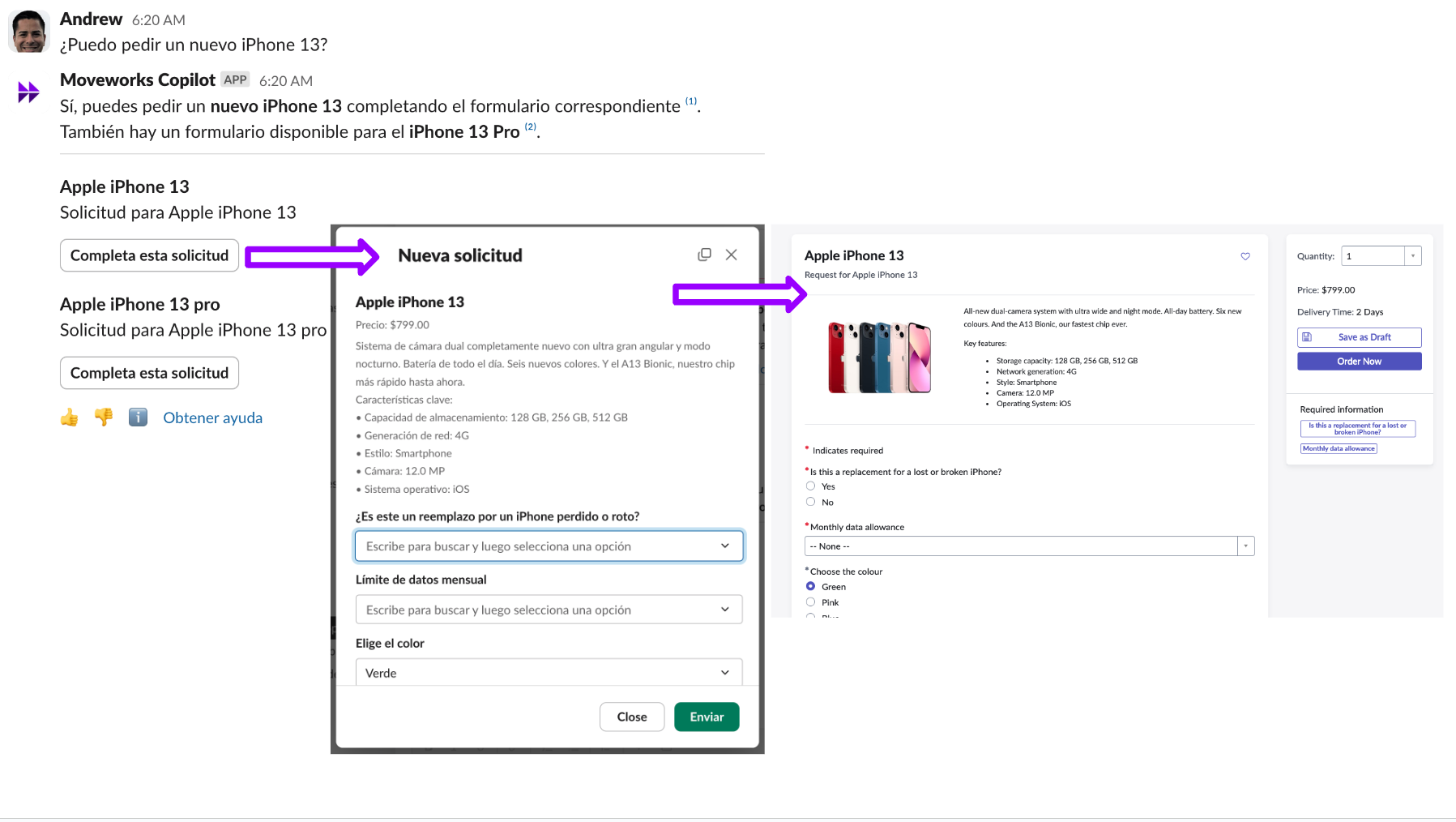
Moveworks searches for relevant forms written in English, then translates the fillable in-chat form into the user’s preferred language.
Native search over forms written in other languages isn’t optimized yet. Forms search works best when forms are written in English. The Assistant can still translate an English form into the user’s preferred language for display and filling in.
Employee Comms
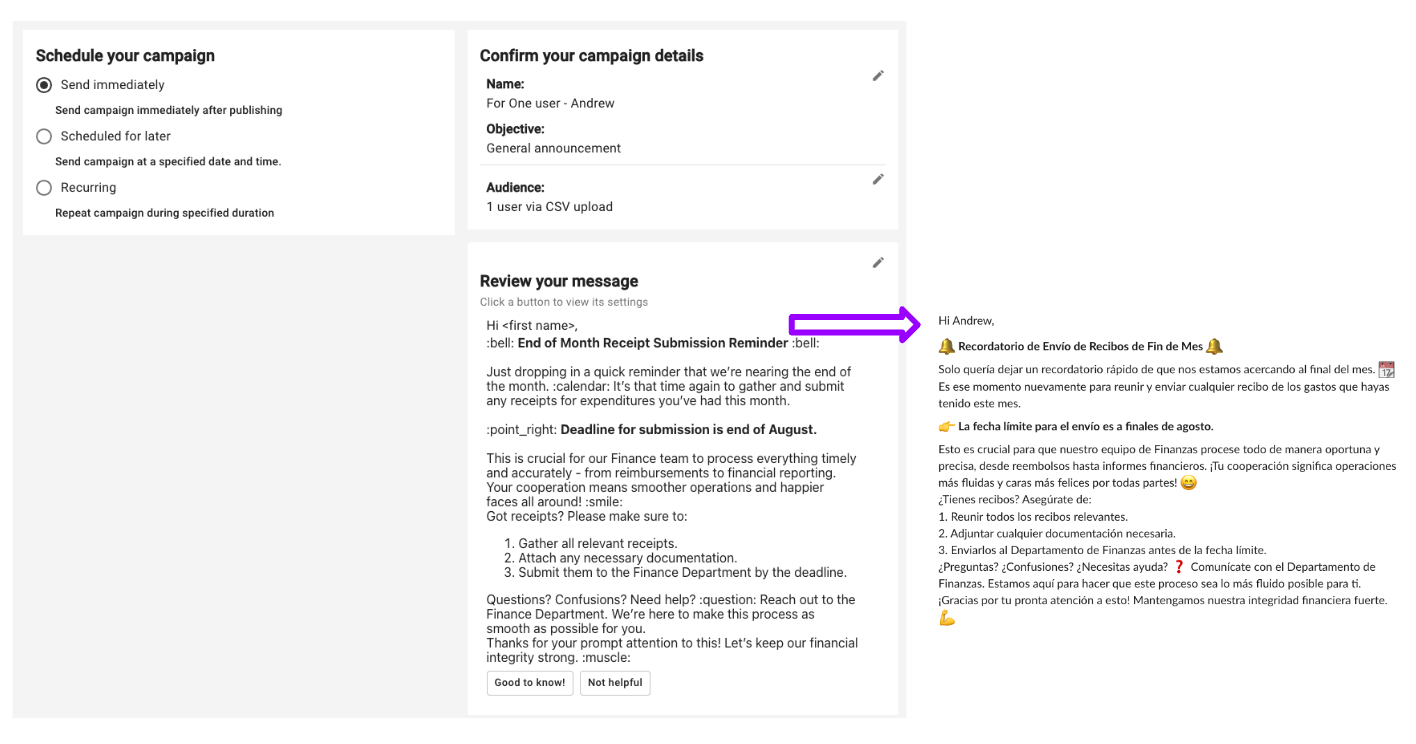
The Assistant translates Employee Comms messages into the user’s preferred language. Translation happens in the background, with nothing to configure in the Employee Comms authoring experience.
If the message is already in the user’s preferred language, it isn’t translated.
Tool Studio tools
Moveworks translates the responses from all Tool Studio tools in the conversation. Citation values aren’t translated, so there’s always a verifiable source of truth.
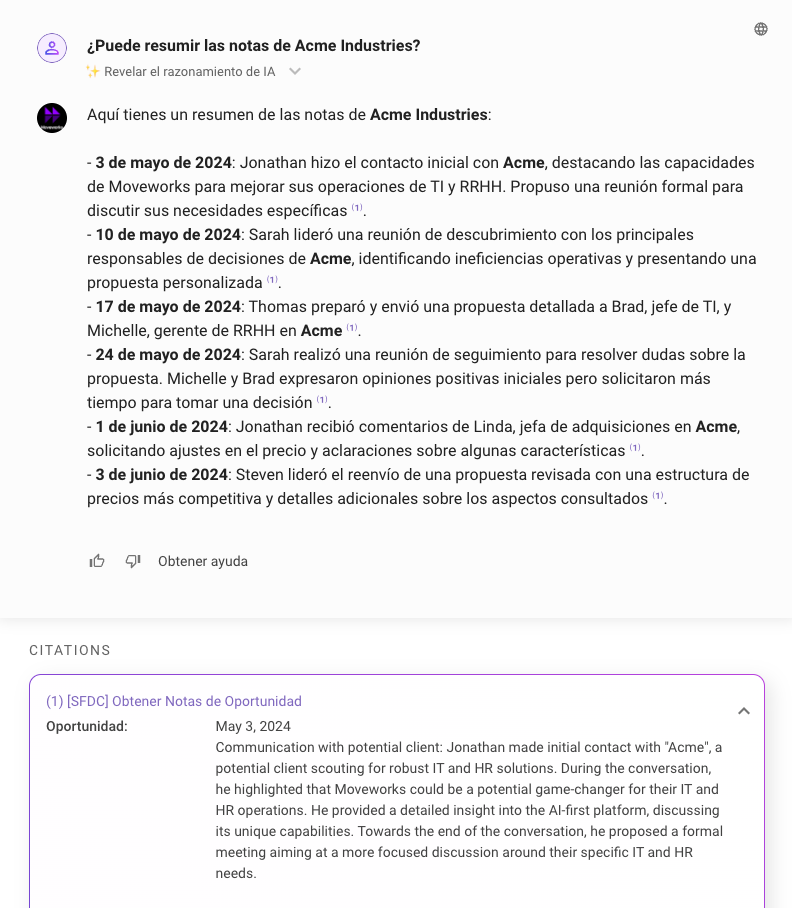
Ticket updates
When an agent updates a ticket, Moveworks notifies the user in the Assistant. Some fields in the notification are translated and some aren’t:
- Ticket field names, such as Status and Assigned to, are translated into the user’s language.
- Comments the agent adds in English are translated into the user’s language.
- Field values from the API, such as status, date, and assignee, aren’t translated. See the FAQ.
Ticket filing translation
When a ticket is filed from the Assistant, Ticket Filing Translation (TFT) machine-translates the user’s non-English text into English. The ticket’s short description is in English, and the work note holds the original text with a note about the translation.
The same translation applies when a user adds a comment to an existing ticket: the comment is translated into English for the agent. The Ticket translation enabled setting, under Multilingual Support > Additional Controls in Moveworks Setup, controls both ticket filing translation and comment translation.
A comment the user writes is translated into English for the agent. A comment the agent writes in English is translated into the user’s preferred language. See Ticket updates.
Exception: chat transcripts added to the ticket as work notes aren’t translated into English.
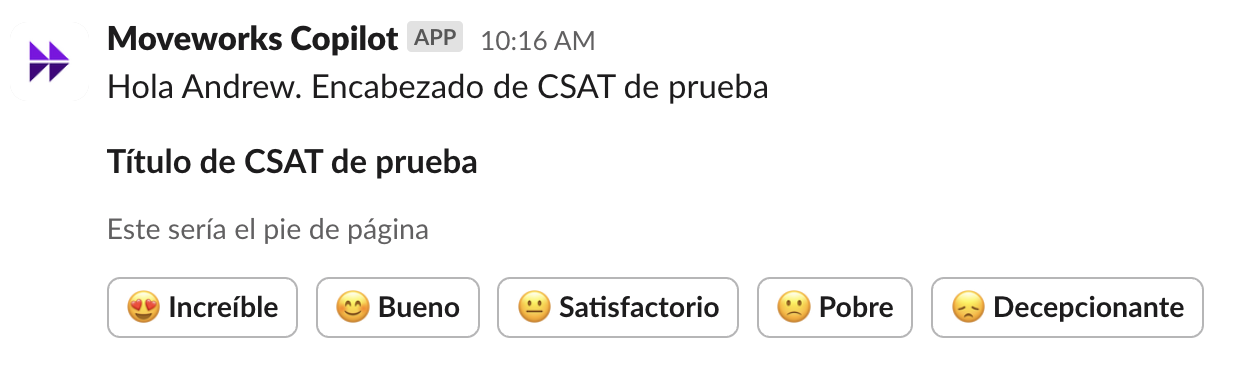
CSAT
Moveworks translates all CSAT messages into the user’s preferred language. Users’ free-text answers aren’t translated and stay in their original language.
Multilingual search
Multilingual search, including the Enterprise Search web app, language coverage, and geography as a ranking signal, is covered in Multilingual Search under Enterprise Search.
FAQ
Q: Can I edit or correct translation errors in Moveworks Setup?
A: You can edit translations of specific source strings that aren’t generated by an LLM. See Translation Overrides Config. Translations of LLM-generated text can’t be reliably corrected or edited. Contact Moveworks Support for guidance.
Q: Why isn’t the state value on ticket fields translated?
A: Moveworks doesn’t translate API values such as status, date, and assignee. LLMs aren’t yet reliable enough to translate them consistently.
Q: Can we set a default language (locale) for all users?
A: Yes. Admins can set a default locale, such as German (de_DE) or Canadian French (fr_CA), for all users from day one.
Q: Are comments translated between agents and users?
A: Yes, both ways. Comments an agent adds in English are translated into the user’s preferred language, and comments a user adds are translated into English for the agent. The exception is chat transcripts added to the ticket as work notes, which aren’t translated into English.
Q: What happened to the Hard, Soft, and Disabled language boost controls?
A: They were removed with Native Multilingual Search. Geography and language are now built-in ranking signals, so the ranker moves locale- and language-appropriate content up without any setup. If you relied on Soft boost to include English fallbacks, you don’t need to do anything. Cross-lingual matching is on by default.
Q: Does file search (PDF, Word, PowerPoint) work in other languages?
A: Yes. Non-English file search is live for PDFs, Word documents, PowerPoint decks, and text files. File results show alongside knowledge article and FAQ results and use the same native ranking.
Q: Do I still need to write a copy of each article in every language?
A: No. One master article works for global policies that don’t change by region, and native ranking retrieves it for a query in any language. If you keep language-specific versions, the ranker prefers the one that matches the user’s locale and query language.
Q: What language are citations shown in?
A: In the Assistant, citations currently show in the user’s preferred language. Later in 2026, citations will show in the source content’s original language, with an inline option to translate them into the query language. In the Enterprise Search web app, citations already show in their original language.
Q: How are several languages in one document handled?
A: Language is detected per document. The most common language in a document is applied to all of its chunks. If an article mixes languages, the less common sections may be classed as the main language and come up less reliably in search. For best results, keep each document in one language. For global policies that need several languages, use a separate document per language and let native ranking pick the right one.
Q: How do I use the geo ranking signal? Is there a setting for it?
A: There’s no admin setting. Geo is a built-in ranking signal in search. To apply it to a document, put the country name in the title, for example “HR policy - Spain” or “IT best practices - France.” The ranker reads the country from the title and moves that document up for users in matching locales.