
Rate My MCP Server
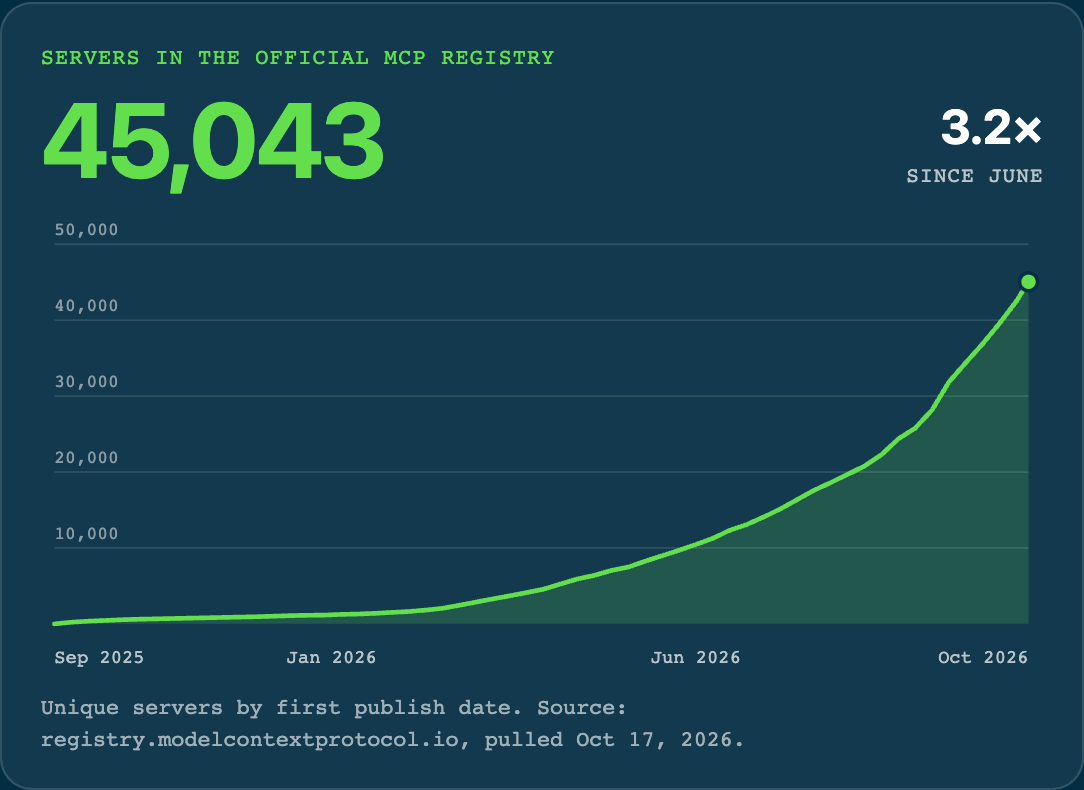
MCP is everywhere. Almost every customer and partner we work with now brings an MCP server, and the official MCP Registry lists 45,043 of them.
Why we built it
The same mistakes kept showing up across our customers and vendors, so we built a tool that helps anyone find and fix them. MCP is great for reads and reversible writes. For actions that have to follow your business rules, use Plugins.
An LLM reviews your server’s tool definitions, and optionally runs read-only test calls, to produce these findings; code turns them into the grade. It can misjudge a tool. Treat each finding as a starting point and check it against your server before you change anything.
Rate a server
- Open aka.mw/rate-my-mcp. The page is open to anyone; you sign in when you rate a server.
- Enter your server’s MCP URL. If you’d rather not connect, paste or attach the server’s
tools/listJSON instead. - Set Test calls. They’re on by default for up to 12 tools. Slide to 50 for more, or to Off and we only read the tool list.
- Click Connect. If the server supports automatic client registration, that’s the whole sign-in. Otherwise, or if you want something else, click Use a different sign-in method and pick Your OAuth app (client ID, secret, and a redirect URI to register), API key, Custom header, or Help me. With Help me you paste the vendor’s setup notes, mask anything secret with Redact, check What the AI will see, and the AI fills in the fields. Secrets are vaulted before the LLM reads anything.
- Watch the progress steps: finding the endpoint, checking HTTPS, reading OAuth metadata, listing tools, reviewing descriptions (“Reviewed 40 of 96 tools”), testing read-only tools, and grading.
Big servers take longer, because the review time grows with the tool list (up to about 150 seconds of review from 95 tools). If an AI call stalls, a second copy goes out and the first answer wins. If the run still runs out of time, the report opens with Scoring incomplete and the reason, and the affected categories show Error instead of a score. The token is revoked when the run ends.
What it checks
About 70 checks in seven categories: Protocol and transport, Tool inventory and granularity, Names and descriptions, Input schemas, Responses and errors, Multi-step and confirmation, and Security and operations.
Code measures the facts. TLS, the MCP handshake, the 401 challenge, OAuth metadata, PKCE, automatic client registration, scopes, HSTS and latency. Then tool counts, definition sizes, naming rules, duplicate names, schema structure and exact repetition, plus response sizes and errors from the test calls.
The LLM makes the judgment calls on 18 practices: whether two tools are distinguishable, whether a description says what the tool is for and what it changes, whether it contradicts itself, whether the objects and IDs make sense, whether responses are readable, and whether risky steps ask for confirmation. Code can point the LLM at a candidate, like a 6,000-character description, but code evidence alone never scores a judgment call. If the AI can’t run, those checks show as not assessed.
Test calls are read-only. Only tools the AI review judges read-only get called. A tool the server marks as writing is never called, and neither is a meta-tool. A fast path calls up to 2 tools the server itself marks read-only while the review is still running. A response over 1 MB shows “Large result, stopped reading at 1 MB” and doesn’t count against Responses and errors.
How the score works
Every finding type has a fixed weight, its share of the score. The score is 100 times the product of (1 − share) across finding types, to one decimal. A finding that hits only some of your tools costs less, on a log scale. Because shares multiply, the score never bottoms out.
- Blockers mean the server can’t be used. A blocker halves the score and fails the grade.
- Grades: A from 90, B from 80, C from 70, D from 60, F below that.
- Severity is fixed per finding type: Major at a weight of 0.10 or more, Minor below.
- One root cause, one deduction. Look-alike tools, tool sprawl, a crammed workflow and an unclear object model on the same tools are charged once, at the heaviest weight. The others say “Counted under …” and cost nothing.
- Size is one capped cost. Definition size, tool count and very large single tools are each measured, and only the largest one is charged, capped at 0.25.
- Server instructions matter more as the server grows. Missing orientation costs nothing at 5 tools and its full weight from 30, and nothing if the object model is already clear.
- The heaviest AI verdicts need proof. Wrong annotations and meta-tools cost 0.25, but only when the LLM quotes the tool’s own text. Without the quote they’re an Info note.
For scale: Linear’s server scores 86.2 (B), DeepWiki 92.2 (A), and a 96-tool server we tested 31.9 (F).
Reading the report
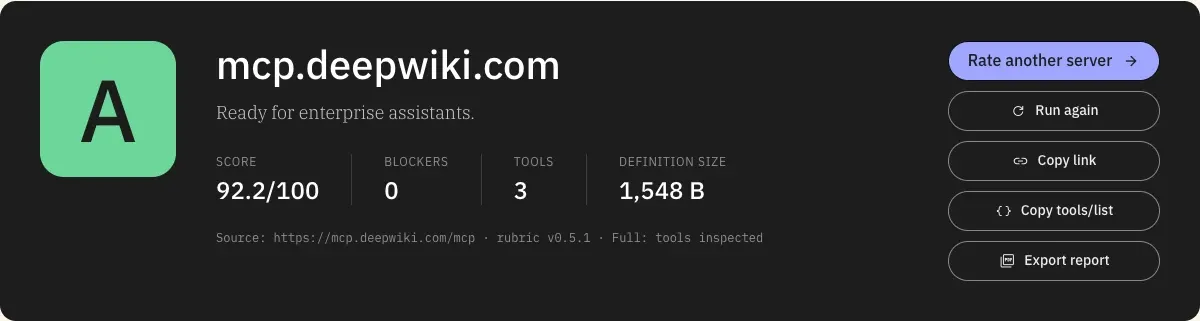
- Fix first lists findings by what they cost you. Every finding shows its cost, like “−4.2”, and a fix.
- Category bars show a whole-number score for each of the seven categories.
- Works with Moveworks? checks whether the server is ready for a Moveworks assistant.
- What an assistant understands about your server shows the objects and relationships the AI could infer from your instructions and tool list. If a person can’t follow it, an assistant won’t either.
- Clarity scores Objects and Relationships out of 100, weighted by how many tools touch each one.
- How they relate is a map of your objects. Unclear links are dashed, and objects with no link sit in a “No tie to the others” box. Click an object or link to see both ends, the tools on each, why it’s unclear and the fix.
- Where it gets unclear lists each confusing spot by tool. Expand a row to see what would make it clear, the full description with the shared terms highlighted, and every parameter. Use j and k to move, Enter to open a row, Esc to close.
- Export report opens the print dialog with every section expanded, so you can save a PDF. For the rubric itself, click View the rubric on the start view; its Export PDF button downloads every practice and check as a PDF. Copy link shares a link that re-rates the server, and Copy tools/list copies the tool list we read.
What good servers do
We rated 27 servers: 14 live hosted servers and the tool lists of 13 official ones. The good ones share three habits.
- They stay small. 20 of the 27 have fewer than 15 tools, which leaves the model almost nothing to confuse.
- They let anyone connect in one click. With automatic client registration, an assistant signs in without anyone filing a ticket with the vendor first.
- They tell the model how to present results. A line like “Don’t repeat these rows in prose” keeps the assistant’s replies clean.
Common mistakes
These examples are illustrative. Each is a pattern we saw in real servers, rewritten so no vendor is singled out.
- Tools that overlap the harness. The harness already finds tools, calls them, holds results, and renders replies. A server that ships
search_tools,run_tool,get_saved_result, orrender_cardleaves the model asking whose job is whose. One render tool said “Always call this before showing incidents,” so the agent called it instead of the incident search. - Look-alike tools.
search_tickets,find_tickets, andlist_my_ticketsmake the model guess. Merge them into oneticketstool with ascopeofmine,team, orall, and give each value a one-line “use when.” - A whole workflow in one tool. One description ran 6,040 characters with 18 conditionals and 26 “always,” “never,” or “only” rules, and an LLM found seven separate jobs inside it. One tool per step is easier to pick and easier to check.
- Side effects buried in the description. A tool that charges money or can’t be undone should say so in its first sentence, not a third of the way into a 6,000-character description.
- Descriptions that contradict themselves. “Returns a run ID right away” and “the first call asks for confirmation and starts no run” can’t both be true, so the model guesses.
- Objects nobody explains. One contact ID showed up under five names:
contact_ids,person_id,pid,people, andperson_refs. Open your instructions with the main objects and how they connect. - Huge definitions. The assistant loads every tool definition into every conversation. The largest server we rated came to 327 KB, about 109,000 tokens, before an employee typed a word. The median was 9.7 KB.
- Thin descriptions. 17 of the 27 servers didn’t tell the model what a tool is for, when to use it over a similar one, or what comes back.
What the benchmark showed
We wanted to know how much better an agent does once a server’s problems are fixed. We took 8 real servers’ tool lists, wrote multi-step jobs that each depend on one of the eight problems above, and ran an LLM on every job as shipped, with one problem fixed, and with every problem fixed at once. A job only counts as done if every step ran in the right order with the right IDs, nothing billed or public ran before the user said yes, and the final answer was right.
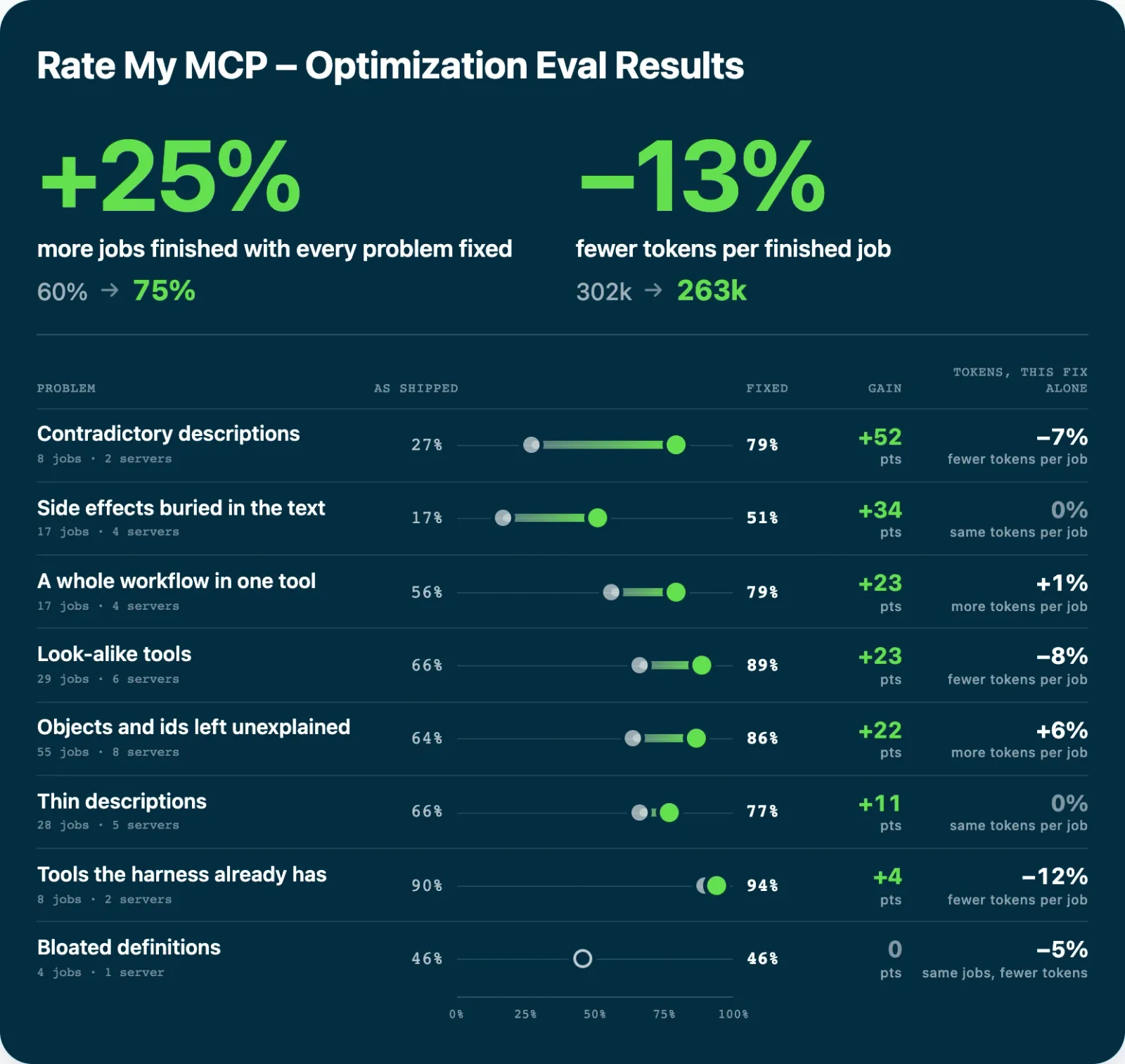
The fixes were tuned on 160 of the jobs, and the other 192 finished 16% more. Some problems appear on only 1 or 2 servers, so single-fix numbers are noisy.
So fix the findings in the order the report lists them and check each one against the model. Keep every parameter and cite the old name when you rename one. Give a merged tool one line per mode saying when to use it. Keep rewrites short.
Try it
Rate your server at aka.mw/rate-my-mcp (sign in to run a rating). The full rubric, with every check, its weight and where it comes from, is on the tool page.