***
title: How to Configure Ticket Interception
position: 1
deprecated: false
hidden: false
metadata:
robots: index
-------------
## Step 1: Navigate to Ticketing > Ticket Interception
This page will contain configurations for each Plugin that is supported for ticket interception
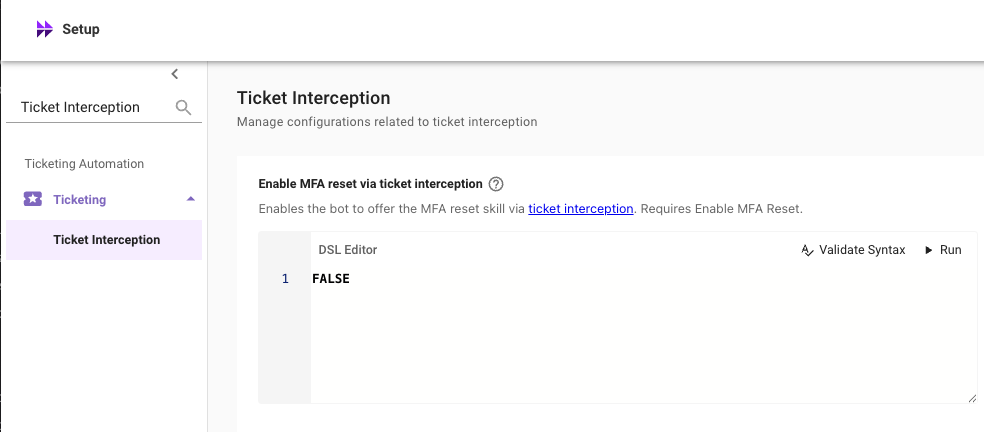
## Step 2: Configure the DSL Rule for Each Plugin
Input a DSL rule for each functionality you would like to enable ticket interception for. Enter **True** to enable ticket interception for all users for that feature.
Note: To enable ticket interception for a few select users you can leverage a DSL rule. For example, the following rule enables the features for only 2 users: (1) [email1@example.com](mailto:email1@example.com) and (2) [email2@example.com](mailto:email2@example.com)
```
user.email_addr IN ["email1@example.com", "email2@example.com"]
```
**Note**: DSL Rules are case sensitive, so ensure the email addresses are lowercase.
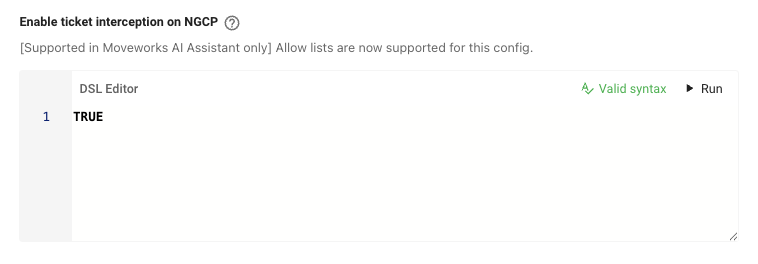
## Step 3: Set "Enable ticket interception on NGCP" to True
This configuration is the top level on/off switch for Ticket Interception. Users must pass both this rule, and the plugin specific rule for a ticket interception to trigger.
## Step 4: Lastly, navigate to ticket filters and configure a filter to ensure only the desired ticket types are eligible for ticket interception.
All tickets that meet the criteria of the **Filter for actionable tickets** will be eligible for ticket interception.
When testing ticket interception, be sure to:
1. File the ticket from your ITSM portal
2. Set the **requestor to a user different from the assignee of the ticket**
3. Ensure the state of the ticket corresponds to **New** status on Moveworks to ensure it is eligible for ticket interception.