***
title: Calendar Management
position: 3
excerpt: ''
deprecated: false
hidden: false
metadata:
title: ''
description: ''
robots: index
-------------
Calendar Management is under development. The Overview outlines a potential experience from the built-in capability.
# Overview
Managing your calendar shouldn’t feel like a full-time job. With Calendar Management, employees can handle everything from finding meeting times to booking events — all through your Moveworks AI Assistant. Let your AI Assistant take care of the back-and-forth, so you can focus on the meeting, not the logistics.
# What Calendar Management Can Do?
## 📆 Book a Meeting
Schedule time with individuals or groups by just asking in natural language.
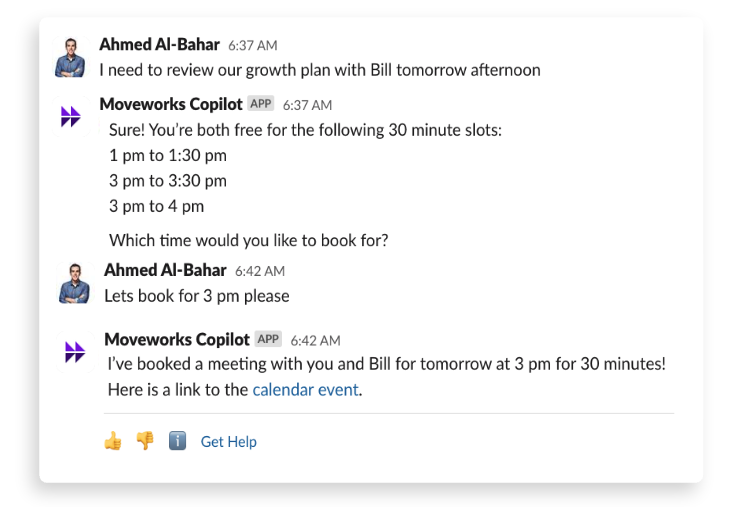
Additional examples:
* “Book 30 minutes with Chris and Taylor next week”
* “Schedule a team sync on Friday at 2 PM”
* “Find time for a follow-up with Alex and Raj before Thursday”
## 🔍 Check Your Schedule
Quickly review upcoming meetings or availability without switching apps.
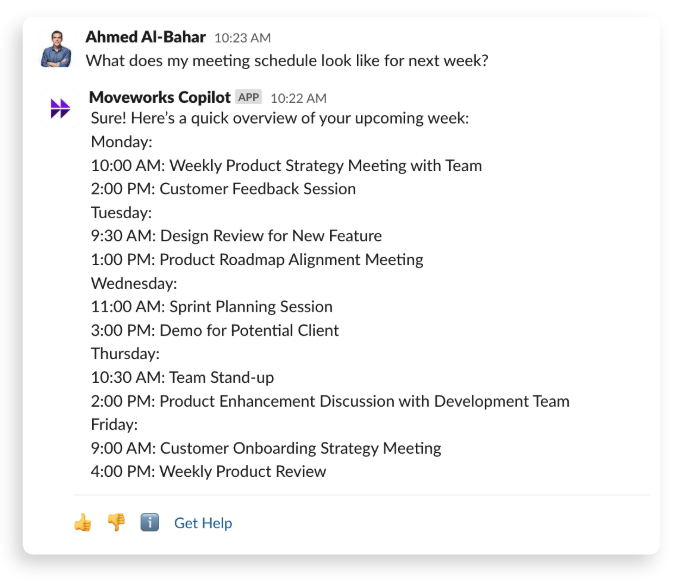
Additional examples:
* “What’s on my calendar this afternoon?”
* “When is my next meeting with Sarah?”
* “Do I have time for a 1:1 tomorrow morning?”
Additional details coming soon!