***
title: 'Lab #4: Forms'
position: 5
deprecated: false
hidden: false
metadata:
robots: index
-------------
## Overview
* **Learning Objectives:** Configure forms ingestion for IT and HR service catalogs, understand the difference between catalog items and record producers, configure fillability overrides, manage form exclusions, and verify forms appear and are fillable in Moveworks
* **Estimated Time:** 45 minutes (20 minutes Part 1 + 25 minutes Part 2)
* **Prerequisites:**
* Lab 0 complete (ServiceNow PDI set up)
* Lab 1 complete (snow connector configured and tested)
* IT Service Catalog with 6-8 catalog items in your PDI (provided by instructor)
* HR Service Catalog with 5-6 catalog items and 2 Record Producers in your PDI (provided by instructor)
***
## 🛠️ 1: Walkthrough
### 1.1: Configure IT Service Catalog Ingestion
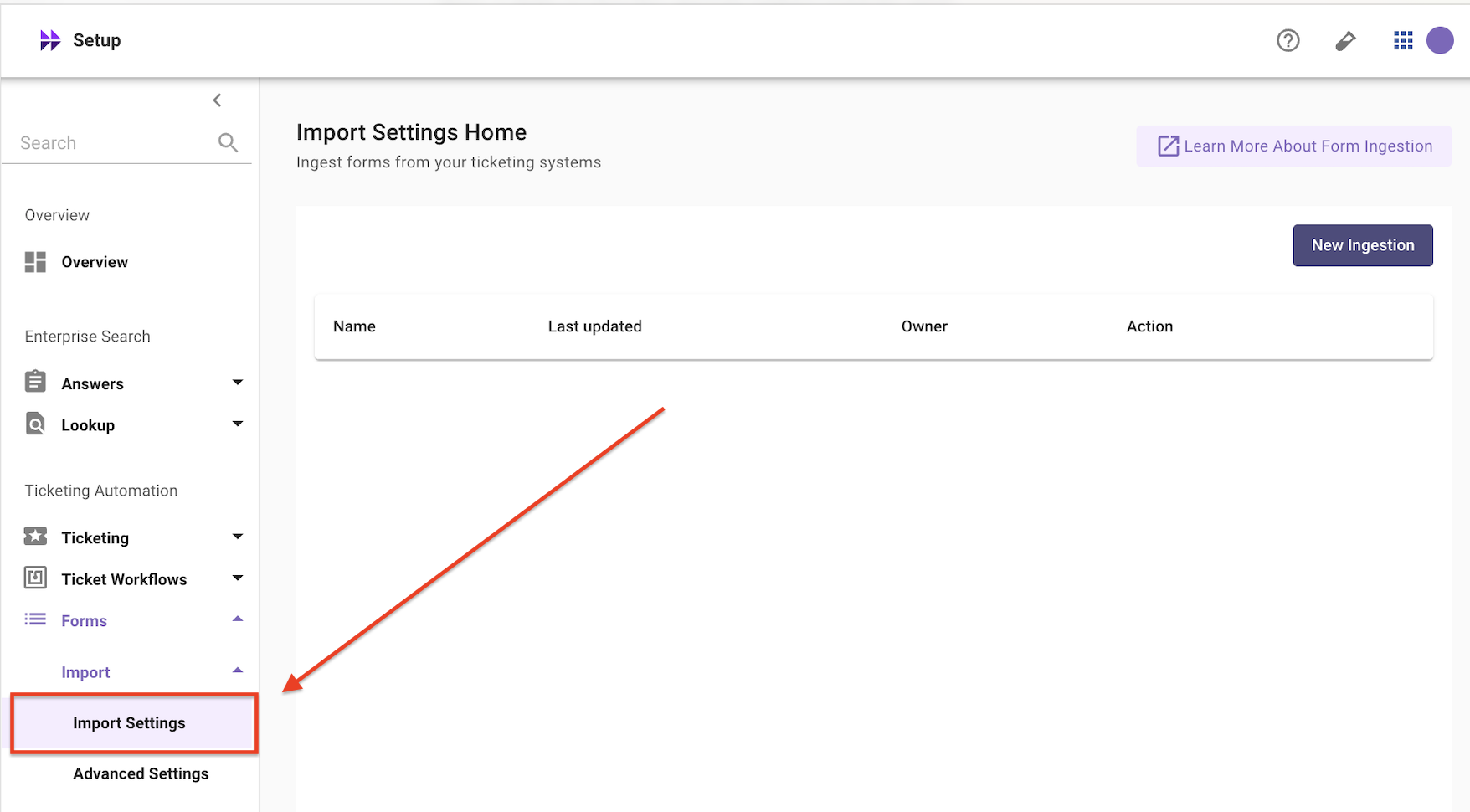
1. Navigate to **`Forms > Import > Import Settings`** in **Moveworks Setup**
2. Click **`New Ingestion`**
3. **Select Integration:** Choose your `snow` connector
4. **Select Domain:** Choose `IT`
5. Under **Filter Settings**, select **`Default Filter`**
6. **Catalog IDs:** Navigate to your PDI and go to `sc_catalog.list` to find the sys\_id of the **IT Service Catalog**. Paste it here.
7. **Form Requester Field Names:** Enter `requested_for`
8. Click **`Save`** and then **`Run Ingestion`**
9. Navigate to **`Forms > Ingested Forms`** and confirm the following forms appear:
| **Expected Form Name** | **Fillable?** |
| -------------------------------- | ------------------------------- |
| Request New Laptop | Yes |
| Request Software Access | Yes |
| Request VPN Access | Yes |
| Order Office Supplies | Yes |
| Conference Room Booking | Yes |
| Badge Access Request | Yes |
| Request Production Server Access | Yes (restricted to IT Dept) |
| Order Dev Tools | Yes (restricted to Engineering) |
* **Check Fillability:** Click on **Request New Laptop** — verify it shows as fillable with variables (`laptop_model`, `delivery_location`, `justification`, `needed_by_date`, `urgent`)
* **Check User Criteria:** Click on **Request Production Server Access** — verify it shows restricted access (IT Department only)
* **Test in Bot:** Open the Moveworks bot in Teams/Slack and type `"I need a new laptop"` — Moveworks should surface the "Request New Laptop" form and begin conversational form filling
**Note:** Check that your connector is valid (Lab 1), the catalog sys\_id is correct, and the catalog items are active in your ITSM.
### 1.2: Add the HR Service Catalog
**Note:** Adding a second catalog with a different domain demonstrates how Moveworks handles multi-domain form ingestion. IT and HR forms are configured independently so they can have different filtering and fillability rules.
1. Navigate to **`Forms > Ingestion`** in **Moveworks Setup**
2. Click **Add Domain Configuration** (or **+ Add** if using the multi-domain view)
3. **Select Integration:** Same `snow` connector
4. **Select Domain:** Choose `HR`
5. Under **Filter Settings**, select **Default Filter**
6. Enter the **Catalog ID** for the HR Service Catalog — find it the same way as section 1.1: go to `sc_catalog.list` in your PDI and copy the sys\_id for **HR Service Catalog**
7. In the **Form Requester Field Names** field, enter `opened_for` — HR catalog items typically use `opened_for` instead of `requested_for`
8. Click **Save** and **Run Ingestion**
### 1.3: Inspect Record Producers
After ingestion completes, go to **`Forms > Ingested Forms`**. You should now see both IT and HR forms. Look for the two **Record Producers**:
| **Form Name** | **Fillable?** | **Why?** |
| -------------------------- | ---------------------------------- | ----------------------------------------------------------- |
| Report IT Issue (Optimal) | Likely **No** — Deflects to portal | Record producer — client scripts may block native rendering |
| Report Issue (Non-Optimal) | Likely **No** — Deflects to portal | Same reason — plus poorly designed variables add complexity |
**Note:** **Why are Record Producers unfillable by default?** Record producers often have client scripts that only run in the ITSM browser. Moveworks can't execute those scripts in-chat, so it conservatively marks them as unfillable and deflects to the portal. You can override this in the next section.
### 1.4: Configure Fillability Overrides
To make the **"Report IT Issue (Optimal)"** record producer fillable in-chat:
1. In **`Forms > Ingestion`** settings, scroll to the **Advanced Deflection & Fillability** section
2. Find the field **Form Filling Enabled Override**
3. This uses DSL (Domain Specific Language) rules. Enter a rule to target the specific form (find the sys\_id by clicking the form in **`Forms > Ingested Forms`** and copying it from the details panel):
```plain text
form.sys_id EQ ""
```
4. Click **Save** and **Re-run Ingestion**
5. Go back to **`Forms > Ingested Forms`** — **"Report IT Issue (Optimal)"** should now show as **Fillable**
**Note:** Only override fillability for record producers where the client scripts are non-essential (cosmetic, auto-fill, or visual-only). If a script performs critical validation, leave the form as deflected — the user will complete it in the ITSM portal instead.
**Fillability Override Reference:**
| **Setting** | **Value** | **What It Does** |
| ------------------------------------ | ------------------- | --------------------------------------------------------------------------------------------------------------- |
| **Form Filling Enabled Override** | `form.sys_id EQ ""` | Forces a specific unfillable form to become fillable in-chat |
| **Form Filling Disabled** | `form.sys_id EQ ""` | Forces a specific fillable form to deflect to the ITSM portal instead |
| **Mark All Eligible Forms Fillable** | Enable | Makes all forms that pass fillability checks available for in-chat filling (use with caution) |
| **Form Deflection Enabled** | Enable | When forms can't be filled in-chat, show a redirect link to the ITSM portal instead of hiding the form entirely |
### 1.5: Exclude Specific Forms
Sometimes you need to exclude specific forms from ingestion entirely (e.g., deprecated items, internal-only forms, or the intentionally bad "Report Issue (Non-Optimal)" record producer).
1. In **`Forms > Ingestion`** settings for the IT domain, find the **Disallowed Form IDs** field
2. Enter the sys\_id of **"Report Issue (Non-Optimal)"** — find it in your PDI at `sc_cat_item_producer.list`, click the form, and copy the sys\_id
3. Click **Save** and **Re-run Ingestion**
4. Verify in **`Forms > Ingested Forms`** that **"Report Issue (Non-Optimal)"** no longer appears
| **Field** | **When to Use** |
| ----------------------- | ------------------------------------------------------------------------------------------------------------------------------------------------------ |
| **Disallowed Form IDs** | Exclude specific forms by sys\_id. Takes priority over all other filter settings — even whitelisted forms. Use for deprecated or broken catalog items. |
| **Whitelist sys\_ids** | Force specific forms to be ingested regardless of filter rules. Useful for forms outside the selected catalog that you still want available. |
### 1.6: Advanced Filtering — Custom Query Filter
Instead of the Default Filter, you can use an **Advanced Filter** with a custom query.
1. Switch the **Filter Type** from Default Filter to **Advanced Filter**
2. Enter a custom query filter. For example:
```plain text
active=true^categoryISNOTEMPTY^sys_class_name=sc_cat_item
```
This example ingests only active, categorized, standard catalog items (excluding record producers and order guides).
**Use Advanced Filters carefully.** The Default Filter mirrors your ITSM portal's visibility rules, which is correct for most orgs. Advanced Filters give full control but can miss forms or over-ingest if the query isn't right. Stick with Default Filter unless you have a specific need.
3. After testing, **switch back to Default Filter** for this lab — Advanced Filters are shown here for awareness
### 1.7: Handling Client Scripts
If a form has client scripts that prevent native rendering, you can tell Moveworks to ignore specific scripts:
1. In **`Forms > Ingestion`** settings, find **Script IDs to Ignore**
2. Enter the sys\_id(s) of the client scripts to skip (find these in your ITSM's script list for the catalog item)
3. After re-ingestion, the form may become fillable in-chat since the blocking scripts are ignored
**Note:** **Which scripts are safe to ignore?**
* **Safe:** Scripts that auto-populate fields or toggle field visibility (cosmetic only)
* **Not safe:** Scripts that validate input formats or calculate values from other fields
* **When in doubt:** Leave the script active — the form will deflect to the portal instead
***
## ✅ 2: Verification & Next Steps
1. **Ingested Forms Check:**
* [ ] IT catalog items: 6-8 forms (minus any excluded)
* [ ] HR catalog items: 5-6 forms
* [ ] "Report IT Issue (Optimal)": shows as **Fillable** (after override)
* [ ] "Report Issue (Non-Optimal)": **Not listed** (excluded via **Disallowed Form IDs**)
2. **Access Control Check:**
* [ ] Log into the Moveworks bot as a user **NOT** in the IT Department or Engineering group
* [ ] Search for "production server access" — it should **not** appear
* [ ] Search for "new laptop" — it should appear and be fillable
3. **Record Producer Check:**
* [ ] Search for "report IT issue" in the bot
* [ ] Moveworks should begin conversational form filling (since you enabled the override)
* [ ] Complete the form and verify a new **Incident** record is created in your ITSM (not a RITM — because this is a record producer)
***
## 🪞 3: Reflecting on This Configuration
Through this guide, you've learned the following:
* How to configure forms ingestion for a single service catalog using a catalog sys\_id
* How to configure multi-domain forms ingestion (IT + HR with separate settings)
* The difference between catalog items (fillable by default) and record producers (may require override)
* How Moveworks handles record producers differently from catalog items — and when to override fillability
* How user criteria carries over — restricted forms are only shown to authorized users in Moveworks
* How to use **Disallowed Form IDs** and **Whitelists** to control which forms are ingested
* How to use **Advanced Filters** for granular control over form selection
* How to handle client scripts that block native in-chat rendering using **Script IDs to Ignore**
* How requester field mapping can differ by domain (`requested_for` vs. `opened_for`)
* How to verify ingested forms in **Ingested Forms** and test them through the bot
***
## ⚙️ 4: Configuration Details
Use the tables below to fill in the required fields accurately.
### IT Service Catalog
| **Field Name** | **Action / Value to Enter** |
| ------------------------------ | ----------------------------------------------------------------- |
| **Integration** | Select your `snow` connector |
| **Domain** | `IT` |
| **Filter Type** | Default Filter |
| **Catalog IDs** | Paste the sys\_id of **IT Service Catalog** from your PDI |
| **Form Requester Field Names** | `requested_for` (auto-populates the requester on submitted forms) |
| **Whitelist sys\_ids** | Leave empty |
| **Disallowed Form IDs** | Leave empty |
### HR Service Catalog
| **Field Name** | **Action / Value to Enter** |
| ------------------------------ | ------------------------------------------- |
| **Integration** | Select your `snow` connector |
| **Domain** | `HR` |
| **Filter Type** | Default Filter |
| **Catalog IDs** | Paste the sys\_id of **HR Service Catalog** |
| **Form Requester Field Names** | `opened_for` |
### Forms Ingestion Settings Reference
| **Setting** | **Where** | **What It Controls** |
| -------------------------------- | ------------------------ | -------------------------------------------------------------- |
| Catalog IDs | Default Filter | Which service catalogs to pull forms from |
| Disallowed Form IDs | Filter | Exclude specific forms (highest priority) |
| Whitelist sys\_ids | Filter | Force-include specific forms regardless of filter |
| Advanced Filter (sysparm\_query) | Advanced Filter | Custom query for form selection |
| Form Filling Enabled Override | Deflection & Fillability | Force unfillable forms (e.g., record producers) to be fillable |
| Form Filling Disabled | Deflection & Fillability | Force fillable forms to deflect to portal |
| Form Deflection Enabled | Deflection & Fillability | Show portal link for unfillable forms instead of hiding them |
| Script IDs to Ignore | Advanced | Skip specific client scripts that block native rendering |
| Form Requester Field Names | Integration | Which field to auto-populate with the requesting user |
| Extra sys\_class Names | Advanced | Ingest forms from custom tables extending `sc_cat_item` |