***
title: Ambient Agents
position: 4
deprecated: false
hidden: false
metadata:
robots: index
next:
pages:
* slug: connecting-ambient-agents-to-conversational-agents
title: Connecting Ambient Agents to Conversational Agents
type: basic
***
Ambient agents monitor enterprise systems continuously, detecting events or changes to initiate workflows automatically.
# Ambient Agent Architecture
Ambient agents follow the **Listen → Understand → Act** cycle.
```mermaid
flowchart LR
A[Listen
Detect signals
via triggers] --> B[Understand
Interpret with LLMs & context]
B --> C[Act
Execute via APIs, scripts, & approvals]
style A fill:#e1f5fe
style B fill:#f0f4c3
style C fill:#ffebee
```
## Listen
Monitor systems for events, data changes, or schedules using [System Triggers](/agent-studio/system-triggers). Examples include new tickets, inactive licenses, or supply chain alerts.
## Understand and Act
Events are fed into a [Compound Action](/agent-studio/actions/compound-actions#/) in both phases:
* **Understand**: Analyze the event with an LLM to interpret context and assess impact.
* **Act**: Execute [Actions](/agent-studio/actions/compound-actions/action), including API calls, scripts, or approvals.
# How Ambient Agents Work
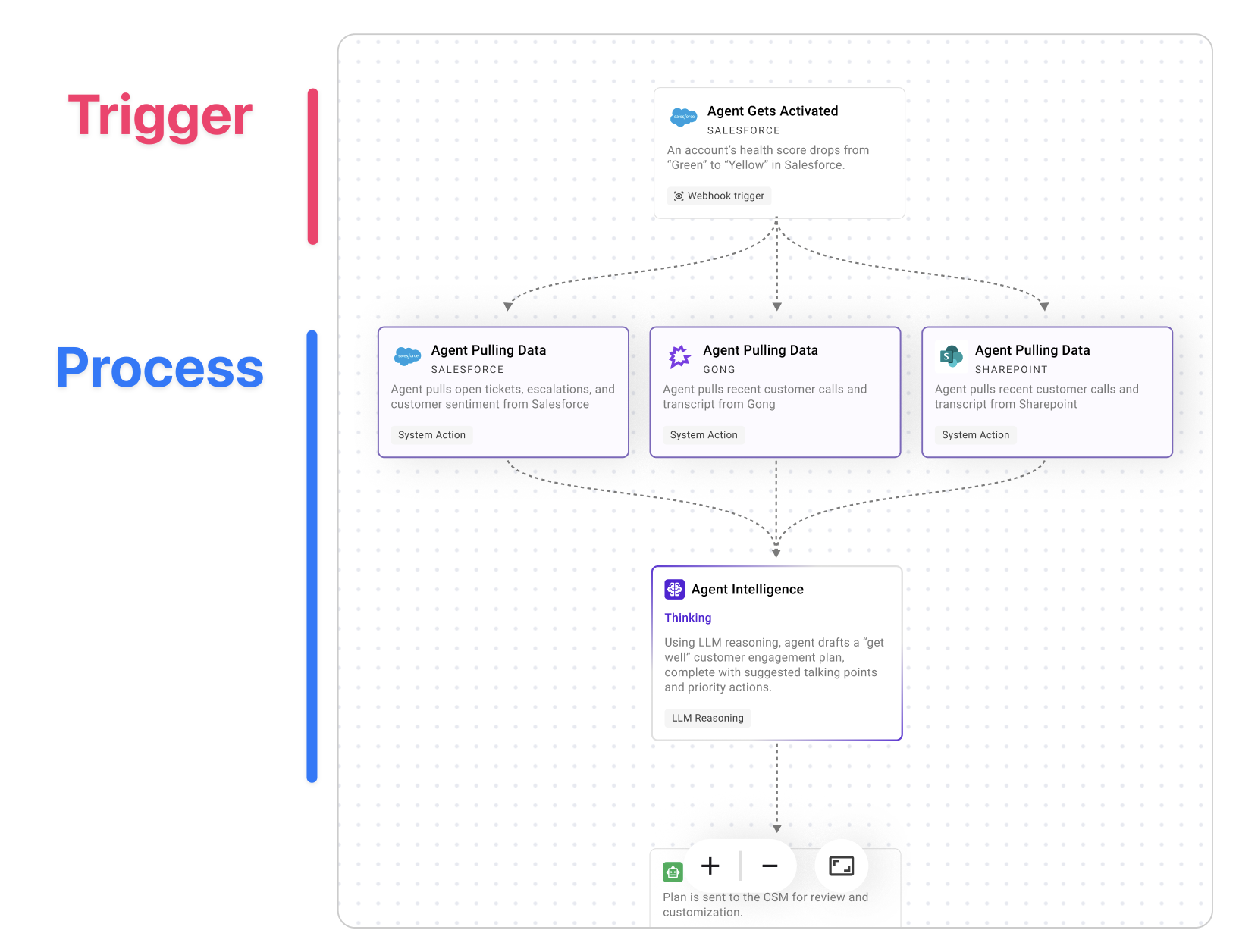
System triggers handle the **Listen** phase and feed events into a Compound Action to **Understand** and **Act**. They use LLMs for reasoning, APIs for integration, and logs for observability.
# Example Use Cases
Ambient agents enable powerful automations across various business functions.
Here are some real-world examples:
* **SaaS License Reclamation**: An ambient IT agent that scans weekly for inactive SaaS licenses, confirms inactivity with the user, reclaims the unused licenses, and saves real dollars every week.
* **Support Ticket Auto-Triage**: An ambient customer support agent that triages new high-priority Jira tickets, attempts to reproduce issues using internal tools, looks for related open tickets, and summarizes its findings, all before a human support agent even opens the ticket.
* **Supply-Chain Disruption Response**: An ambient supply chain agent that detects potential disruptions, diagnoses the root cause, and then recommends and executes adjustments once approved.
You can brush up on best practices for [Ambient AI agents in our cookbooks](/agent-studio/cookbooks/ambient-agents-cookbook#/).
# Get started
1. Review the **[System Triggers Overview](/agent-studio/system-triggers#/)**
2. Build with **Webhook Triggers** via the [Quickstart](/agent-studio/system-triggers/webhook-triggers#/)
3. Debug and iterate using [Logs & Troubleshooting](/agent-studio/system-triggers/webhook-logs-troubleshooting-guide#/).