***
title: Return
position: 4
deprecated: false
hidden: false
metadata:
robots: index
-------------
# Overview
The **Return** expression signals the end of a compound action's execution, streaming mapped data back to the chat for user-layer runs. In system-layer runs, it will stop quietly, and any returned data is sent to the caller. The expression also works as an early-return expression, you can place it at the end of the flow or in a Switch case to simplify logic.
Unlike an error-based exit (handled by a `raise` expression), the `return` expression exits gracefully, providing a way to output data in a structured format using the **`output_mapper`**, which follows the [Moveworks Data Mapping](/agent-studio/core-platform/configuration-languages/moveworks-bender-language-reference) Syntax.
#### Different behaviors based on content
| Context | What Happens | Best For |
| :--------------- | :----------------------------------------------------- | :----------------------- |
| **User-Layer** | Returns data and the assistant provides it to the user | Deliver results to users |
| **System-Layer** | Returns data and it is provided to | Backend orchestration |
* Be mindful of our [token limits](/agent-studio/actions/script-actions/apithon-a-special-kind-of-python).
* Return statements have some reserved keywords for [Citations](/agent-studio/core-concepts/citations-1) (`results` & `result`). Please do not use the keyword "result" unless you plan to include an "id" and "friendly\_id" (optional) which will create a citation.
# Low-Code Editor
Add the Return step and map the data to be returned.
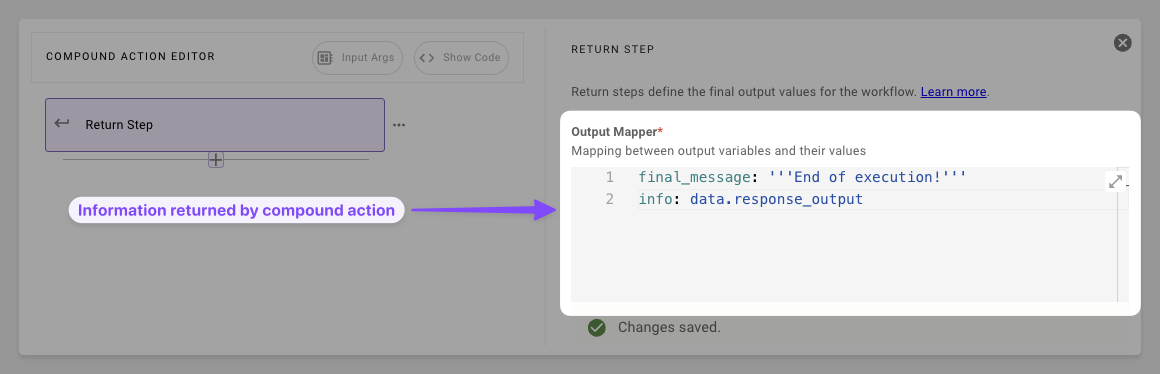
1. **Map the Data**: Build the output mapper with keys and DSL, pull from the data bank and transform on the fly.
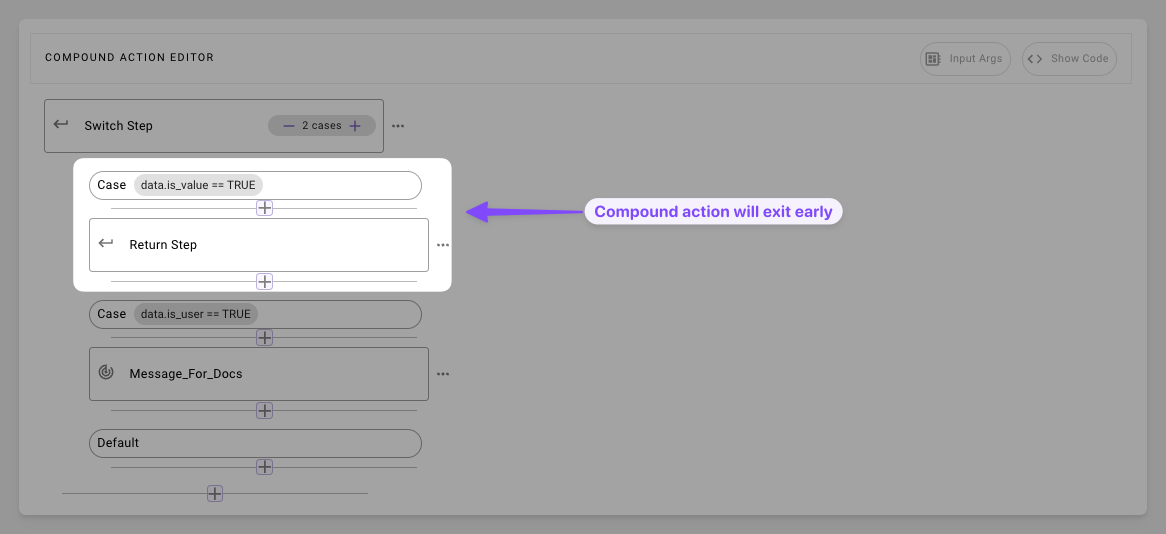
1. **Leave Early**: Stop execution early when condition is triggered in switch cases
# Syntax Reference
#### Schema
```yaml
return:
output_mapper: # Optional dict for structured chat output (user context only)
key1: DSL_MAPPED_VALUE # e.g., "summary: data.results | $JOIN(', ')"
key2: DSL_MAPPED_VALUE # Supports transforms like MAP(), $TITLECASE()
# Reserved: Avoid "result" unless for citations (needs "id"/"friendly_id")
```
#### Fields
| Field | Type | Mandatory | Description |
| :-------------- | :--- | :-------- | :-------------------------------------- |
| `output_mapper` | dict | No | Transforms and maps data bank variables |
# Practical Examples
### Example 1: Basic Action Handoff
Return the aggregated result of two actions
#### Compound action
```yaml
steps:
- action:
action_name: fetch_data_one
output_key: action_output_one # e.g., { "status": "success", "data": { ... } }
- action:
action_name: fetch_data_two
output_key: action_output_two # e.g., { "priority": "2" }
- return:
output_mapper:
output_one: data.action_output_one
output_two: data.action_output_two
```
#### Result Expectation
```json
{
"output_one": {
"status": "success",
"data": {
"value": 42,
"description": "The answer to life, the universe, and everything."
}
},
"output_two": {
"priority": "2"
}
}
```
### Example 2: Filtered User List
Transform a list of users
#### Compound action
```yaml
steps:
- action:
action_name: fetch_users
output_key: users_output
- return:
output_mapper:
user_list:
MAP():
items: data.users_output
converter:
id: item.id
display_name: item.name.$TITLECASE()
```
#### Data bank
```json
{
"data": {
"users_output": [
{ "id": "user1", "name": "alice", "age": 30 },
{ "id": "user2", "name": "bob", "age": 25 },
{ "id": "user3", "name": "charlie", "age": 35 }
]
}
}
```
#### Result Expectation
```json
{
"user_list": [
{
"id": 1,
"display_name": "Alice"
},
{
"id": 2,
"display_name": "Bob"
},
{
"id": 3,
"display_name": "Charlie"
}
]
}
```
### Example 3: Early return in Switch
Skip approval process if user is admin
```yaml
steps:
- switch:
cases:
- condition: meta_info.user.role == "admin"
steps:
- action:
action_name: grant_access_to_grafana
output_key: admin_grafana_access_output
- return: # Early exit here
output_mapper: {}
default:
- steps:
- action:
output_key: create_generic_approval_request_result
action_name: mw.create_generic_approval_request
input_args:
approval_key: '"MANAGER"'
approval_details: '"Need access to Grafana"'
users_requested_for: meta_info.user
- action:
action_name: do_another_action
output_key: another_action_output
- action:
action_name: do_another_action_two
output_key: another_action_output_two
```