***
title: Notify
position: 6
deprecated: false
hidden: false
metadata:
robots: index
-------------
# Overview
**Notify** pulls compound actions into the chat spotlight, sending messages to specific users with embedded actions, shown as buttons, that can perform various actions when clicked.
### Action Types
| Type | Function |
| :---------------------- | :----------------------------------------------------------------------------------- |
| **Content Action** | Deliver an inline message. Ideal for links or summaries |
| **System Action** | Triggers an action or compound action with input arguments |
| **Conversation Action** | Starts a conversation process. Inputs args must be declared as slots in the process. |
#### *Requirements for Calling a Conversation Action*
*To ensure your action is triggered correctly, please note the following:*
* ***Use the Conversational Process Name**: When calling the action, specify the name of the conversational process itself, not the name of the plugin.*
* ***Conversational Action input\_args**: These must be declared as slots in the conversational process in order to reference the data passed in as input args.*
# Low-Code Editor
Add a **Notify** step, define the recipient, the content of the message they are receiving, and what actions they'll be provided with.
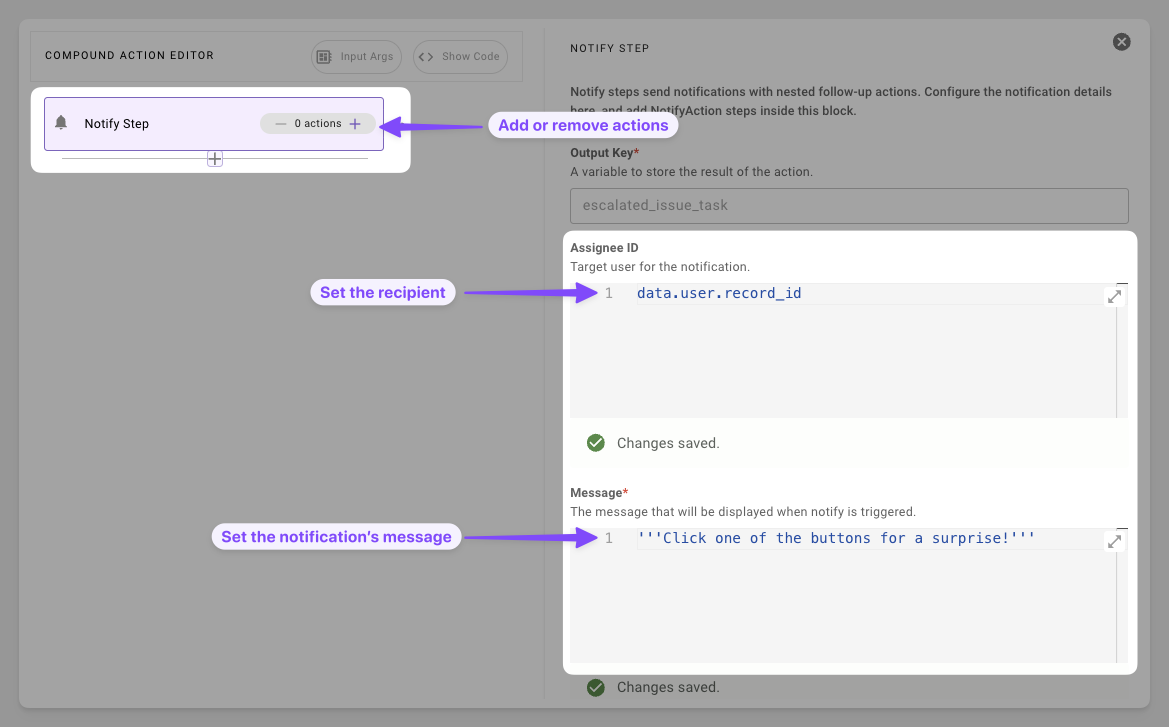
1. **Prepare Essentials**: Set the notification's recipient and informational message.
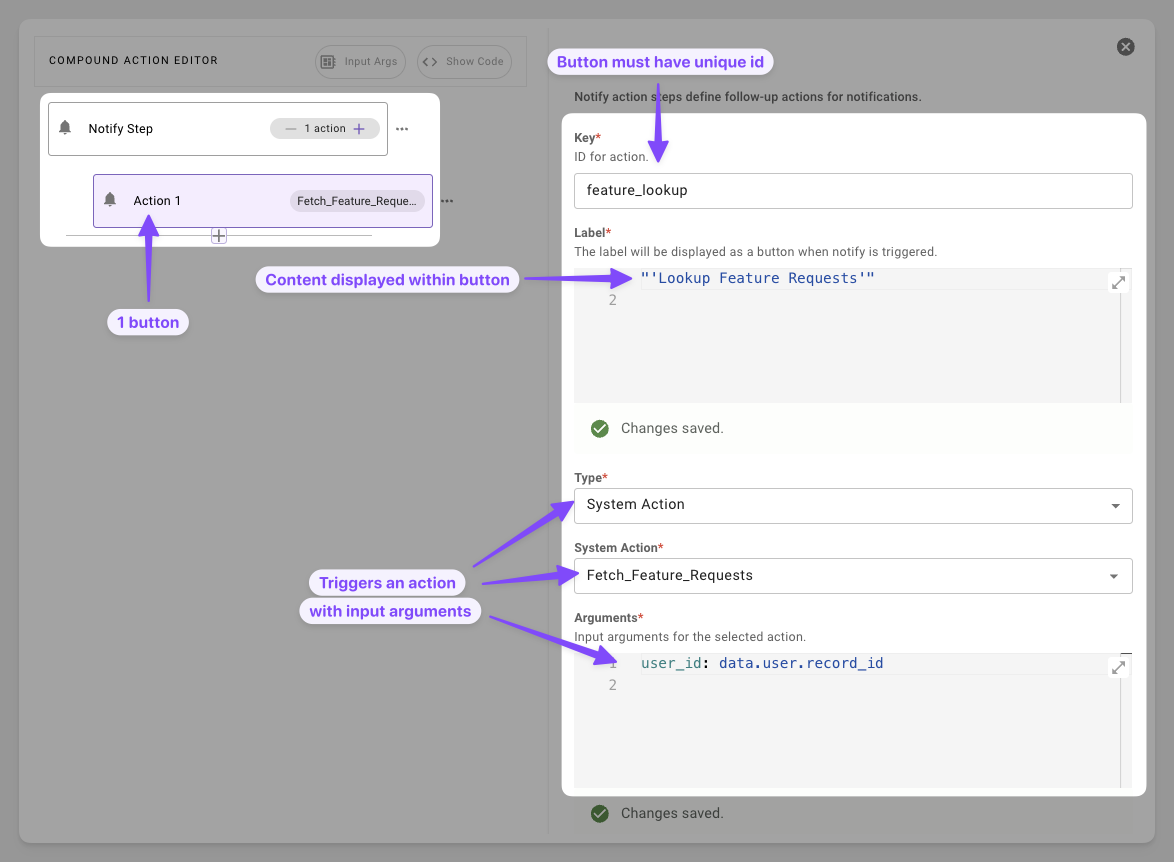
2. **Add Actionable Task**: Add a button that can trigger an HTTP, compound, or script action.
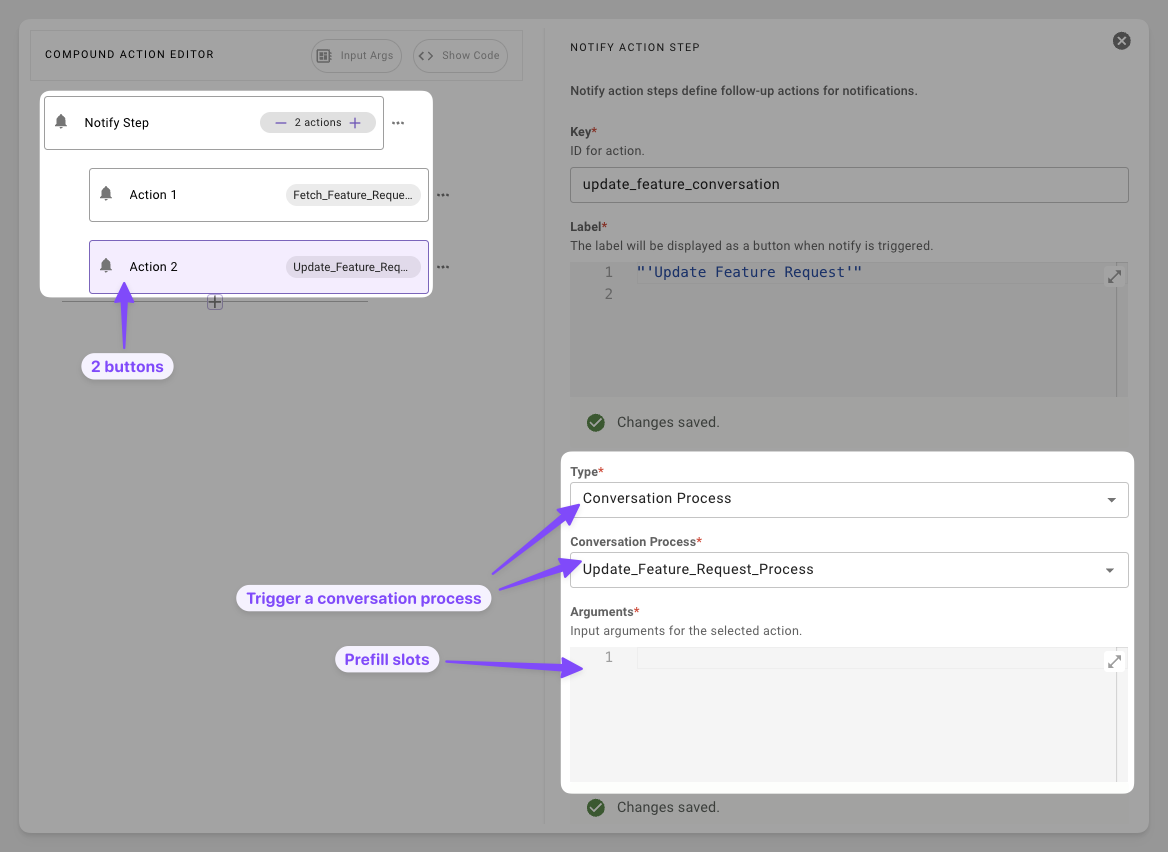
3. **Start a Conversation**: Add a button that invokes a conversational flow with the user.
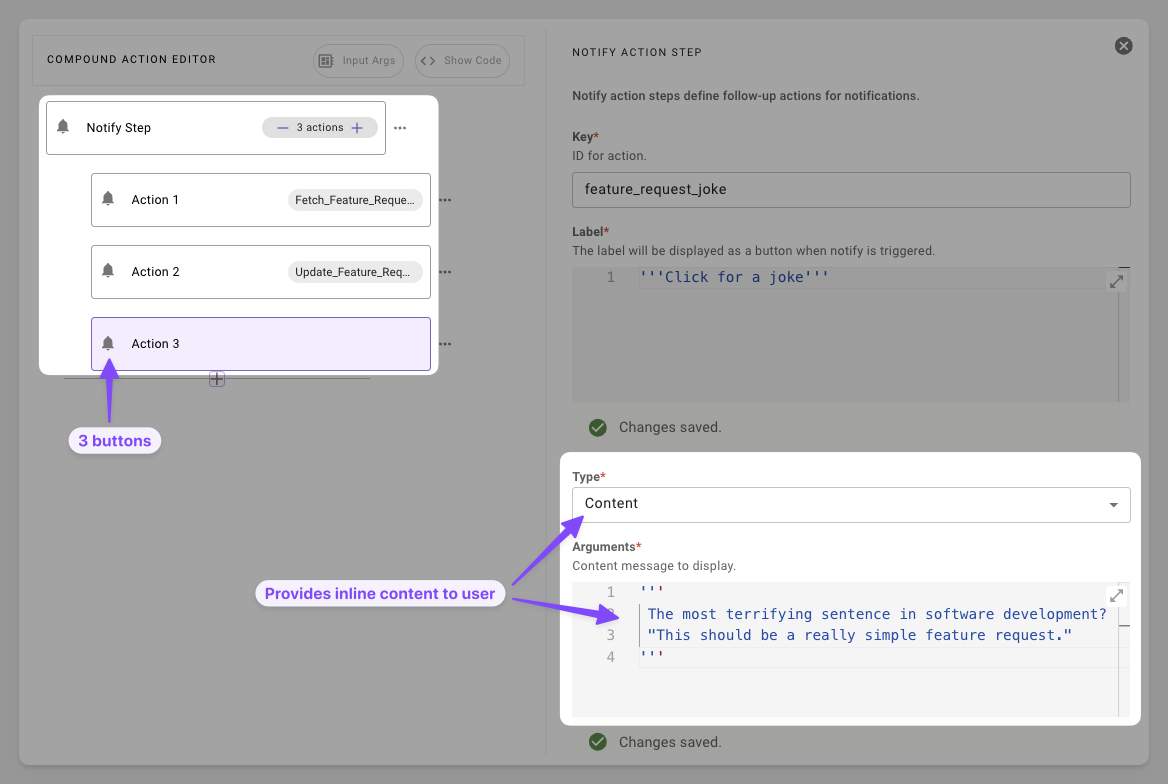
4. **Add More Content**: Provide a button that provides inline content that doesn't require fetching or starting a conversation.
# Syntax Reference
#### Schema
```yaml
notify: # Delivers message + buttons to user
output_key: RESULT_VAR* # str: Stores interaction results
recipient_id: USER_ID* # str: e.g., data.user.id
message: MSG_EXPR* # DSL str or RENDER() template
resources: # Optional list[dict] only available in pro-code
- name: RESOUCE_NAME # str: no dsl evaluation just type out string
datatype: DATA_TYPE # datatype: no dsl evaluation just type out string
value: VAL # DSL of datatype declared above
actions: # Optional list[dict]
- key: ACTION_KEY # Unique str ID
label: BUTTON_TEXT # Display DSL str
# ONE of:
content_action:
message: CONTENT_MSG
system_action:
action_name: ACTION_NAME
input_args:
key: VAL
conversation_action:
conversation_process_name: PROCESS_NAME # Published plugin
input_args:
slot_name: VAL # Match process slots
```
#### Fields
| Field | Type | Mandatory | Description |
| :------------- | :---------- | :-------- | :--------------------------------------------------- |
| `output_key` | string | Yes | Capture's button outcome. **Currently returns NULL** |
| `recipient_id` | string | Yes | ID of the target user |
| `message` | string | Yes | DSL expression field |
| `actions` | list\[dict] | No | Buttons displayed to user |
| `resources` | list\[dict] | no | Pass additional context to the reasoning engine |
#### Resources Schema
| Field | Type | Mandatory | Description |
| :--------- | :----- | :-------- | :-------------------------------------------------------------------------- |
| `name` | string | Yes | Name of the resource |
| `datatype` | string | Yes | Datatype of value; options [here](/agent-studio/core-concepts/data-types#/) |
| `value` | any | Yes | DSL expression field: Value of data to pass as context |
#### Action Types
| Field | Keys | Use Case |
| :-------------------- | :---------------------------------------- | :--------------------------- |
| `content_action` | `message` | Quick info drops. |
| `system_action` | `action_name`, `input_args` | Invoke actions |
| `conversation_action` | `conversation_process_name`, `input_args` | Start conversation processes |
# Resources
Resources are an optional field that can be used in the pro-code syntax. These are used for passing additional data as context for the LLM. These can be used situationally for giving the llm additional data to reference when using a follow up action such as passing a string to the LLM for SDA reasoning.
`"instructions": "Analyze the data for the top commented on tickets"`
### Example 1: Enforcing specific analysis on an action button click
```yaml
# input args: data.tickets
notify:
output_key: user_choice
recipient_id: data.target_user.id
message:
RENDER():
template: "Click the button below for insights on the top commented tickets"
args:
id: data.ticket.id
resources:
- name: instructions
datatype: string
value: '"Analyze the data for the top commented on tickets"'
actions:
- key: view
label: "'View Tickets'"
system_action:
action_name: retrieve_all_tickets
input_args:
support_tickets: data.tickets
```
# Practical Examples
### Example 1: Simple Ticket Alert
Notify assignee with a link
```yaml
notify:
output_key: alert_sent
recipient_id: data.target_user.id
message:
RENDER():
template: "Hello {{name}}, [T-{{id}}]({{link}}) assigned to you. Follow runbook."
args:
name: data.target_user.first_name
id: data.ticket.display_id
link: data.ticket.url
```
**Expectation**: User will receive a simple notification message with the ID of the ticket they were assigned
### Example 2: Multi-Option Response
Offer multiple options to the user
```yaml
# input args: data.ticket
notify:
output_key: user_choice
recipient_id: data.target_user.id
message:
RENDER():
template: "Ticket {{id}} assigned—act now."
args:
id: data.ticket.id
actions:
- key: view
label: "'View Ticket'"
content_action:
message:
RENDER():
template: "View ticket {{id}}"
args:
id: data.ticket.id
- key: convert
label: "'Convert to Bug'"
system_action:
action_name: convert_support_issue_to_known_bug
input_args:
support_ticket: data.ticket
```
**Expectation**: User will receive a notification about a ticket that was assigned to them. They will be provided two buttons, one to look at the ticket and one to convert the ticket.
### Example 3: Handoff to Conversation
Alert the user and collection more information
```yaml
# input args: data.ticket
notify:
output_key: handoff_result
recipient_id: data.target_user.id
message:
RENDER():
template: "[{{id}}]({{url}}) assigned—need details?"
args:
id: data.ticket.display_id,
url: $CONCAT(["https://notion.so/", data.ticket.sys_id], "")
actions:
- key: send_back
label: "'Send Back'"
conversation_action:
conversation_process_name: collect_reason_for_send_back_and_send_case_back_to_case_owner
input_args:
support_ticket: data.ticket
```
**Expectation**: User receives the notification and are prompted to start a conversational process to send back the ticket for more information.